
Best Power Strips for Conference Tables: Clean, Accessible Power on Demand
Answering the demand for tidy, reliable conference room power there is a choice of recessed, desk-mount, and multi-outlet power strips. This guide highlights five options that balance outlets, USB charging, and safe mounting for conference tables. Best for: teams needing clean tabletop aesthetics, easy access, and reliable surge protection during meetings. The following picks favor recessed, edge-mounted, or clamp-style designs to minimize cable clutter while maximizing accessibility for attendees and presenters.
| Product | Best For | Key Benefit |
|---|---|---|
| Anker Slim Power Strip | Clutter-free desks and small conference tables | Flat plug, compact footprint, 10 connections with USB |
| VILONG Recessed Power Strip | Centered conference tables with built-in look | 6 outlets, 8 USB ports, 1200J surge, flush reveal |
| Anker 2100J Outlet Extender | Large device loads and media setups | 12 outlets, USB-C and USB-A, robust surge protection |
| Jgstkcity Desk Clamp Power Strip (40W) | Edge-mounted desks and standing desks | 4 PD 20W USB-C, 2 USB-A, clamp mount |
| HHOSET 8-Outlet Heavy Duty | Workbenches, classrooms, and rugged conference tables | 8 wide-spaced outlets, wall-mount option, 1200J surge |
Anker Power Strip With 300J Surge Protector

Best for compact desks. This Anker model combines 6 AC outlets with 2 USB-A and 2 USB-C ports. Its slim form and flat plug reduce desk clutter, providing reliable power for meeting devices, laptops, and presentation gear. Best for small conference tables or personal workstations where space is at a premium.
- 6 AC outlets, 2 USB-A, 2 USB-C ports for 20W charging
- Flat plug design for easy insertion and minimal obstruction
- Compact dimensions support clutter-free desks
Who it suits: presenters, executives, and assistants needing a single, neat power hub without a bulky footprint. Caution: USB-C ports share power with other outlets, so high-draw devices may impact simultaneous charging.
VILONG 45W Recessed Power Strip

Best for conference tables with a built-in look. This recessed power strip includes 6 outlets and 8 USB ports, a 6ft cord, and a 1200J surge protector. The 45° flat plug simplifies under-table routing, reducing visible cables and improving safety on shared tables.
- Recessed design for a clean conference table surface
- ABS+PC fire-resistant shell, 1200J surge protection
- Cutout-friendly footprint for flush installation
Who it suits: rooms needing a single, built-in power solution with strong surge protection. Caution: recessed installation requires table modification to fit the cutout.
Anker 2100J Surge Protection Power Strip

Best for larger conference setups with multiple devices. This Anker model features 12 AC outlets plus USB-A and USB-C ports, delivering broad power capacity for meeting rooms, video conferencing equipment, and charging stations. Strong surge protection infrastructure is designed for sustained use.
- 12 AC outlets, 1 USB-C, 2 USB-A ports
- 20W USB-C fast charging potential for compatible devices
- 8-point safety system for surge and overload protection
Who it suits: conference spaces with many participants and devices. Caution: the high outlet count may require careful cable management to avoid tangling.
Jgstkcity Desk Clamp Power Strip (40W)

Best for edge-mounted setups on conference tables or desks. This clamp-style power strip offers 4 PD 20W USB-C ports and multiple USB-A ports, totaling around 40W. The desk-edge clamp keeps cables away from tabletop space while providing quick access to power for laptops and presentation devices.
- 4 PD 20W USB-C ports, 2 USB-A ports
- Desk-edge clamp for semi-permanent mounting
- 6ft flat plug, 1875W capacity, ETL listed
Who it suits: environments prioritizing a secure edge mount with fast USB-C charging. Caution: ensure desk edge thickness compatibility and maintain clearance for clamping mechanism.
HHOSET Heavy Duty 8-Outlets
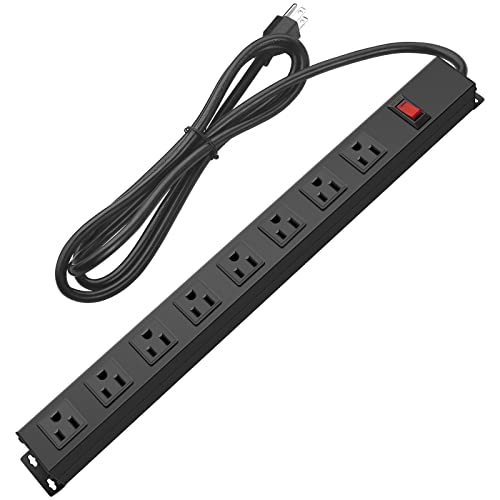
Best for rugged conference rooms, classrooms, or workshops where durable mounting is needed. This metal, wall-mount-ready power strip offers 8 outlets, a built-in surge protector, and 6ft cord. Its robust design suits environments with frequent setup changes and heavy equipment load.
- 8 wide-spaced outlets; wall-mount capability
- 6ft cord; 1200J surge protection
- Durable metal housing for heavy use
Who it suits: spaces requiring rugged mounting options and high outlet density. Caution: bulkier than some under-table options; plan cable routing accordingly.
Buying Guide: Power Strips For Conference Tables
What mounting style fits your table? Recessed units disappear into the table surface, edge clamps keep power within reach without table clutter, and standard power strips with flat plugs minimize obstruction on top versus behind the desk.
How many outlets are needed? For meetings with multiple devices, aim for at least 6–12 outlets plus USB ports. USB-C PD ports help quick-charge laptops and phones during longer sessions.
Is surge protection important? Yes. A 1200J–2100J surge rating is common in office-grade strips and protects equipment from surges caused by power fluctuations or nearby equipment cycling.
What about safety and certifications? Look for ETL-listed or UL-listed devices with fire-resistant housings. For conference environments, surge protection and overcurrent/overload safeguards are essential.
Which mounting method reduces clutter? Recessed or edge-mount designs keep cables off the tabletop, reducing tripping hazards and enhancing a professional appearance for attendees.
FAQ
- Q: What is the advantage of a recessed power strip for conference tables? A: It provides a clean, built-in look with cables hidden below the surface, reducing clutter and improving safety.
- Q: How many USB ports should I prioritize? A: At least two USB-A and one USB-C is common, with USB-C PD charging for faster device charging.
- Q: Can I install a power strip on any conference table? A: Some models require a cutout or edge clamp; verify table thickness and surface material before installation.
- Q: Should I choose a model with a flat plug? A: Yes, flat plugs help prevent protruding fixtures and keep the setup neat under desks or on low-profile surfaces.
- Q: How important is surge protection for meeting equipment? A: Important to protect projectors, displays, laptops, and docking stations from power spikes.
- Q: Do these power strips support high-powered devices? A: Many models support up to 1500W or more; check the power rating and total combined load to avoid overloading.