
Best Multi-Outlet Surge Protectors With USB Chargers for Safer, Smarter Power Ready
Looking for a reliable multi-outlet surge protector with USB charging? This guide highlights five top options, each suited for different spaces and devices. The selections emphasize wall-mount or wall-friendly designs, ample USB ports, and solid surge protection. Ideal buyers include: students needing dorm-room convenience, remote workers seeking clutter-free desks, small offices, and frequent travelers who want compact, travel-ready power hubs. Below, a quick buying table helps compare basics at a glance.
| Product | Outlets | USB Ports | Surge Rating | Best For |
|---|---|---|---|---|
| QINLIANF 5 Outlet Extender | 5 | 4 USB | Unknown | Wall-friendly, compact office use |
| One Beat 6-Outlet Extender | 6 | 4 USB (2 USB-C) | 1800J | Home/Office with rotating plug |
| Addtam 6-Outlet Extender | 6 | 4 USB (2 USB-C) | 1800J | Dorms and desks needing space |
| BlueStars Wall Mount Power Strip | 6 | 4 USB (2 USB-C) | 1050J | Compact, versatile indoor use |
| Lvetek 5-Outlet Extender | 5 | 4 USB (1 USB-C) | 1680J | Space-saving wall mounting |
QINLIANF 5 Outlet Extender With USB Ports
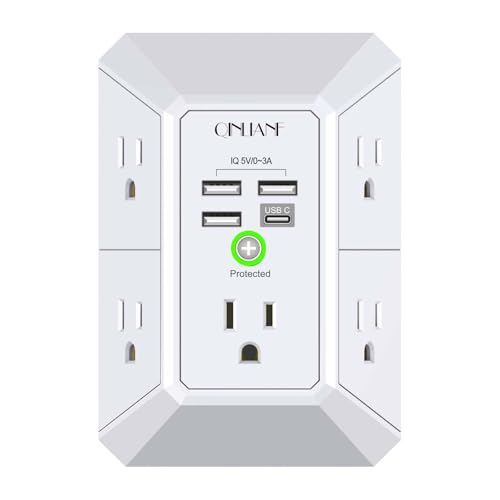
The QINLIANF wall-mountable surge protector provides 5 AC outlets across three sides and 4 USB ports, including USB-C, with smart charging technology that adapts to connected devices. It is designed to secure onto a duplex outlet using the middle screw to prevent accidental unplugging. Best for spaces where wall mounting is preferred and outlets are a premium, such as home offices or compact apartments. A key limitation: this model is specified for duplex outlets and may not fit outlets with more than two parallel socket sets.
Who this is best for: a renter or student needing a wall-secured, space-saving hub for multiple devices, including phones, tablets, and small appliances. Why chosen: its three-sided outlet layout and USB mix maximize compatibility without crowding adjacent outlets. Caution: verify wall outlet spacing before purchase to ensure compatibility with your wall plate.
Product Details
- 5 AC outlets (three sides) with ample spacing
- 4 USB charging ports (A and C)
- Smart charging detects devices for optimal speed
One Beat Surge Protector Outlet Extender

This 10-in-1-style extender offers 6 AC outlets plus 4 USB ports (2 USB-C) and an 1800J surge rating. The design features a 180-degree rotating plug for flexible placement and wide spacing between outlets to accommodate larger adapters. Best for desks or bedside setups where a single compact unit must cover many devices without blocking sockets. Limitation: the USB-C ports deliver up to 3A total; some high-demand USB-C devices may require dedicated fast chargers.
Who this is best for: home offices or living rooms needing a central charging hub with a flexible plug orientation. Why chosen: rotating plug and high spacing reduce the risk of blocked sockets. Caution: check the USB-C capacity if you rely on high-wattage USB-C devices.
Product Details
- 6 AC outlets, 4 USB ports (2 USB-C)
- 1800J surge protection
- Rotating 180-degree plug
Addtam Surge Protector Outlet Extender

The Addtam outlet extender provides 6 AC outlets and 4 USB ports (2 USB-C), supported by an 1800J surge protection circuit. Its broader spacing and three-side design help prevent outlets from blocking each other. This unit is well-suited for dorm rooms, home offices, and travel needs, particularly when multiple devices must charge simultaneously. Limitation: USB-C ports share power and may not deliver maximum amperage to all devices at once.
Who this is best for: students, renters, or small offices needing a robust USB-inclusive power strip. Why chosen: strong surge protection and wide outlet spacing help accommodate bulky adapters. Caution: ensure your wall outlet can securely support the included mount features.
Product Details
- 6 AC outlets with 4 USB ports (2 USB-C)
- 1800J surge protection
- Wide spacing designed for bulky adapters
BlueStars 6-Outlet Wall Mount Power Strip

This BlueStars wall-mountable power strip includes 6 AC outlets and 4 USB ports (2 USB-C) with a total 1050J surge rating. It emphasizes compact design, a built-in circuit breaker, and a USB layout intended to optimize charging—though one note is that the USB-C port may not support high-demand adapters like some laptops. Best for compact desks, dorm rooms, or apartments needing simple, reliable charging with surge protection.
Who this is best for: users seeking a compact, reliable charging hub with wall-mount capability and clear safety features. Why chosen: reputable protection with a practical USB mix. Caution: Type-C charging capability is limited for certain high-voltage devices; verify device power needs before relying on USB-C for laptops.
Lvetek 5-Outlet Extender With USB

The Lvetek unit extends power from a standard duplex outlet to 5 outlets plus 4 USB ports, including a USB-C port (total 5V, up to 4.2A across ports). It uses a 1680J surge protection rating and emphasizes a wall-mount-ready design with a simple screw-on attachment. Best for small spaces like bedrooms or dorm desks where a slim, wall-centric charger hub is preferred. Limitation: the USB-C output is not specified as high-wattage; it’s best for mobile devices and accessories rather than power-hungry laptops.
Who this is best for: travelers and students seeking a discreet, wall-friendly charging station. Why chosen: strong surge protection and practical USB mix in a compact form factor. Caution: ensure the mounting method is compatible with your outlet configuration and wall surface.
Buying Guide: Key Considerations For Selecting a Multi-Outlet Surge Protector
What matters most when choosing a multi-outlet surge protector with USB chargers? Here are practical questions and considerations to guide your decision:
- How many outlets and USB ports do you need? Compare total devices versus USB-A and USB-C capabilities to avoid overloading a single hub.
- What is the surge rating you require? Higher joules offer better protection for sensitive electronics; check energy ratings and protection components like MOVs or TVS diodes.
- Is wall mounting important? If space is tight, a wall-mountable design can reduce clutter and provide stability for frequent plugging/unplugging.
- Do you need USB-C fast charging? Ensure USB-C ports support adequate amperage for your devices; some units share power across ports, affecting peak speeds.
- What about spacing between outlets? Larger spacing helps accommodate bulky adapters without blocking adjacent sockets.
- Are there any safety features? Look for built-in circuit breakers, child-safe housings, and overload protection to prevent damage from shorts or overloads.
- Is the unit appropriate for travel or dorm-use? Travel-friendly units are typically lighter with compact footprints and simple mounting or no-mount designs.
FAQ
- What is a typical surge protection rating to look for? A rating around 1000-1800J is common; higher ratings offer greater protection for multiple devices.
- Can I mount these on any wall outlet? Most are designed for duplex outlets; verify compatibility with your outlet type and wall plate before mounting.
- Do USB-C ports always provide high-wattage charging? Not always. Some USB-C ports deliver up to 3A at 5V, which is suitable for phones and tablets but not all laptops.
- Should I avoid any brands? There’s no need to avoid brands outright, but check safety certifications (ETL, FCC, ROHS) and verify the unit fits your space and power needs.
- Is it safe to daisy-chain surge protectors? It is not recommended. Use a single surge protector per outlet to maintain proper surge protection and electrical safety.
- What’s the best way to secure a wall-mounted unit? Use the included mounting screw and confirm the unit sits flush against the wall to prevent accidental dislodging.