Best Wireless Thermostat for AC: A Clear Guide to Smart Temperature Control
Looking for a wireless thermostat for your air conditioning system? This guide highlights five top options, explaining who they’re best for, what they do well, and where they may fall short. Whether you want simple scheduling, strict energy savings, or advanced smart features, these picks help you choose the right fit for homes, apartments, or office spaces that rely on central cooling. The buyer personas covered include tech-savvy residents, energy-conscious households, renters needing easy installs, and small offices seeking reliable remote control.
The Google Nest Thermostat (Charcoal) is a compact Wi‑Fi thermostat designed to integrate with Google Home, offering programmable schedules and energy insights. It’s a solid pick for households already using Google Assistant and for renters who want a straightforward upgrade to voice-controlled comfort.
The Nest Learning Thermostat (4th gen) with the 2nd gen Temperature Sensor is designed for hands-off optimization. It learns user patterns to optimize comfort and energy savings. Best for tech-forward homes seeking proactive energy management and a polished look in common areas.
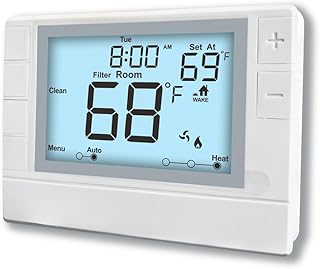
Programmable Thermostat (White Backlight) offers broad compatibility with single or multi-stage systems. It features a large LCD and straightforward controls, making it a good fit for homeowners who want an easy setup and reliable operation without smart features. Best for those seeking solid, non-smart scheduling control.
The Venstar ColorTouch T8900 adds humidity control in a clean white design. This thermostat is best for spaces where humidity management is a priority and a contemporary look is desired. A potential limitation is its more traditional interface, which may feel less modern than smart devices.
The Sensi Smart Thermostat (Wi‑Fi, Energy Star) is well-suited for DIY enthusiasts who want reliable smart control and easy setup. It integrates with major voice assistants and offers straightforward scheduling. Best for budget-conscious users who still want modern scheduling and remote access.
Buying Guide: Key Considerations
What to evaluate when selecting a wireless thermostat for AC systems:
Compatibility: Confirm your HVAC equipment (single-stage, multi-stage, heat pump, etc.) and wiring compatibility with the thermostat model.
Connectivity: Decide between Wi-Fi for remote control and smart features or a non‑smart model for simpler operation.
Smart features: Consider voice assistant support, energy reports, geofencing, and automation routines that align with your daily schedule.
Display and usability: A clear, legible screen and intuitive controls help daily use, especially for guests or renters.
Installation: Check if the base and wiring match your existing setup and whether you need professional installation.
Future-proofing: Look for compatibility with your preferred ecosystem (Google, Apple HomeKit, Amazon Alexa) for longer-term value.
Frequently Asked Questions
What is a wireless thermostat for AC?
A wireless thermostat controls your air conditioning system remotely via Wi‑Fi or a dedicated wireless protocol, enabling scheduling, temperature control, and sometimes smart home integration.
Do wireless thermostats save energy?
Yes, many models provide energy-saving features like scheduling, adaptive recovery, and remote adjustments, which can reduce cooling usage when you’re away.
Can I install a thermostat myself?
Many are designed for DIY installation with standard wiring. Some complex systems or heat pump configurations may require a professional installer.
Which thermostat works with Google Assistant?
Models in the Google ecosystem, such as the Nest line, typically offer native Google Assistant integration for voice control and automation.
Is a learning thermostat worth it?
Learning thermostats adapt to your routines to optimize comfort and efficiency, but they may come with a higher upfront cost and a learning curve.
Should I replace all thermostats in a building with smart models?
If you want centralized, remote control and consistent energy management, upgrading multiple zones can deliver cohesive efficiency benefits.
Achieving a wider stance and enabling larger wheels on a 5×114.3/5×114.3mm platform is a common goal for enthusiasts seeking improved aesthetics and handling. The following 5 products provide 5×114.3 to 8×170 bolt pattern adapters, crafted from forged aluminum with precision machining and durable studs. This guide highlights key features, compatibility, and practical considerations to help…
This guide highlights five portable air purifiers that pair well with portable air conditioners or standalone use for creating healthier indoor air. Each product is evaluated for small-space performance, filtration effectiveness, battery or power options, and ease of use. Use this overview to compare models that fit bedrooms, offices, dorms, cars, and on-the-go environments. Buying…
Finding the best quick car battery charger means choosing a device that not only charges efficiently but also protects and maintains your battery’s health. This article presents top smart battery chargers that support various battery types, feature automatic maintenance modes, and offer temperature compensation for reliable performance in different climates. Below is a summary table…
Looking for a solid 100Ah deep cycle battery to power your RV, solar setup, trolling motor, or off-grid system? This guide highlights five top 100Ah AGM deep-cycle options and explains who each is best for. Each entry includes why it was selected, practical pros and a cautious note to help you compare quickly. Product Best…
Finding a reliable 2000 watt amp wiring kit is essential for peak performance and safe installation. This guide evaluates five top options, highlighting power handling, wiring quality, and ease of use. Each kit is suitable for single-amp setups around 2000 watts, with sturdy cables, protective fusing, and organized harnessing. Read on to compare features and…
Protecting family members with hearing loss requires fire alarms that rely on multiple alert channels. The following hand-picked selection focuses on hard-of-hearing-friendly detectors and alerting systems that combine loud alarms, flashing lights, bed shakers, and wireless connectivity to keep rooms informed—even when you’re in another part of the house. Each option below emphasizes reliability, ease…