
Best Wireless 4-Way Light Switches for Multi-Location Control
Find the right wireless 4-way light switch kit for hassle-free, wall-damage-free control across rooms. This guide highlights five top options that work without rewiring, ideal for renters, seniors, or anyone upgrading lighting without a full electrical project. Each product is evaluated for best use scenario, ease of installation, and potential limitations.
The following table compares core details at a glance to help you choose quickly:
| Product | Best For | Key Benefit |
|---|---|---|
| Wireless Remote Light Switch Kit (Avorecta) | Three-way, no wiring | Self-powered switches with long RF range |
| RunLessWire 4-Way Kit | Large rooms and long hallways | Three switches plus receiver; no wiring between switches |
| Ortis Wireless Kit (3 Switches) | Flexible expansion, no rewiring | Up to 300 ft range; battery included in receiver |
| Leviton Decora Anywhere Companion | Wire-free compatibility with Decora Smart | Easy integration with existing Decora systems |
| SURAIELEC 3-Way Kit | Interference-free multi-kit setups | Pre-programmed and expandable with 10A/1250W rating |
Wireless Remote Light Switch Kit, 3 Switches + 1 Receiver

Best for renters and mobility-friendly homes, this kit enables three locations to control one light without new in-wall wiring. The switches are self-powered, so there is no battery replacement or wall damage. The receiver sits between power and the light, and it does not require a neutral wire or Wi-Fi. The strong RF signal covers up to 330 ft in open space and traverses walls and floors.
Who it’s for: renters, seniors, or anyone avoiding wall modifications. Limitations: optimal performance depends on clear line-of-sight and may experience range variation in dense layouts.
RunLessWire 4-Way Battery-Free Kit
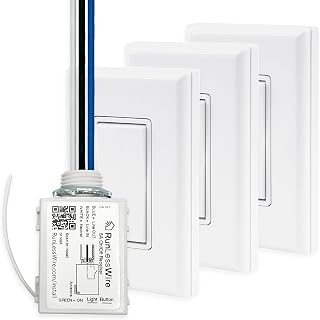
Three self-powered switches pair with one receiver to manage a light, outlet, or fan from three different locations. No wiring between switches is required, and the switches harvest energy from each press. This kit is well-suited for large rooms or long hallways where multiple control points are beneficial.
Who it’s for: homes with long corridors or open floor plans. Limitations: 5A receiver rating means suitable for small to medium loads; verify your fixture’s rating before use.
Ortis Wireless Kit (3 Switches & Receiver)

This kit emphasizes a 300 ft range in open space and the ability to expand control without rewiring. The receiver runs on a battery, and the switches mount anywhere with screws or adhesive, making it flexible for hallways or stair landings. It’s suitable for lamps and basic fixtures without altering the wall structure.
Who it’s for: homes needing practical, expandable wireless control. Limitations: battery in the receiver requires occasional replacement, and performance can vary with obstacles.
Leviton Decora Smart Anywhere Companion

This companion unit adds wire-free 3-, 4-, or 5-way control to Decora Smart Wi-Fi switches. It mounts on the wall surface or at a wall box, within about 50 feet of the primary device. It’s ideal for expanding control points in modern smart homes that rely on Decora ecosystems.
Who it’s for: users already in the Decora Smart family seeking seamless expansion. Limitations: requires the primary Decora Smart switch to function; not a standalone control solution.
SURAIELEC 3 Way Wireless Kit

Designed for interference-free operation, this kit supports three-way configurations with no wiring between switch and light. It includes a pre-programmed receiver and compact switches that can be mounted on brackets. It’s rated at 10A/1250W, suitable for most lamps and bulbs, and can be expanded with additional kits in the same space.
Who it’s for: households needing reliable, multi-switch control with minimal setup. Limitations: ensure your loads stay within the receiver’s 10A rating for safe operation.
Buying Guide
What should you consider before buying a wireless 4-way kit?
- Transmission range: measure distance between intended switch positions and the receiver to ensure the kit meets your space needs.
- Power and wiring: decide between battery-free or battery-powered options and whether your walls can accommodate mounting choices.
- Load compatibility: verify the receiver’s wattage rating matches your lights or fixtures to avoid overloading.
- Expansion readiness: if you plan to add more switches later, check if the system supports additional remotes or multi-point control.
- Interference handling: look for kits with rolling or dynamic codes to minimize cross-talk in busy homes with multiple kits.
Wired vs. wireless: which is better for you?
Wireless kits avoid wall damage and rewiring, making them ideal for renters or temporary improvements. Wired setups may offer more stable performance in dense layouts but require wall access and potential professional installation.
Installation tips
- Place receivers near the light fixture to minimize voltage drops and maximize reliability.
- Mount switches on durable surfaces using screws or strong adhesive, depending on wall material.
- Test range by stepping through locations to confirm consistent commands before finalizing placement.
Common limitations to expect
- Battery-free switches may have limited signaling power in very dense structures.
- Receiver placement is critical; obstacles can impede range.
- Some kits require a neutral wire in the fixture for full compatibility.
FAQ
- Do these kits require Wi-Fi?
- Can I add more switches later?
- Are these suitable for all light types?
- Is neutral wiring required?
- What’s the best option for renters?
- Can these control fans or outlets?
No. Most listed kits operate via RF signals or kinetic power, without needing Wi-Fi.
Yes. Several kits are expandable with additional switches or compatible add-ons, but check each model’s expansion capabilities.
Most are designed for standard lamps and fixtures. Verify the receiver’s wattage rating matches your load.
Some models require no neutral wire, while others may benefit from a neutral connection in certain installations. Review product details.
Battery-free, wall-damage-free options that install between power and the fixture are ideal for renters seeking minimal changes.
Many kits support lights, fans, or outlets at the same time, but confirm each product’s load rating and compatibility before use.