
Best Vertical Cable Management for Server Racks
Vertical cable management solutions help keep data-center and server-room cables organized, reducing clutter and improving airflow. This guide highlights five top options ideal for 19-inch racks and 40U or larger enclosures, focusing on ease of installation, accessibility, and cable protection. Best for hands-on technicians, network engineers, and IT managers seeking scalable organization without tools. Below is a quick summary table of the chosen products to compare at a glance.
| Product | Type | Approx. Size | Best For |
|---|---|---|---|
| StarTech 40U Vertical Cable Manager, 2-Pack 3ft (CMVER40UF) | 0U Finger Duct | 3 ft each | Large racks; flexible mounting |
| StarTech 40U Vertical Server Rack Cable Manager, 2-Pack 3ft (CMVER40UD) | 0U D-Ring/Vertical | 3 ft each | Cable routing with low strain |
| Leviton Vertical Front Only Cable Management, 5″ Channel x 80″ long | Front-only Duct | 80 inches | Front-access cables; easy install |
| StarTech 20U Vertical Server Rack Cable Manager, D-Ring, 2.8ft (CMVER20UD) | 0U D-Ring | 2.8 ft | Smaller footprint; tidy routing |
| StarTech.com 3ft Vertical Cable Management Duct with Cover – 0U | Finger Duct with Cover | 3 ft | Tidiness and protection |
StarTech 40U Vertical Cable Manager, 2-Pack 3ft

The StarTech CMVER40UF provides two 3-foot panels for versatile vertical cable management. It supports 40U or larger racks with 0U design and offers tool-free installation. The finger-duct setup simplifies cable access while maintaining a clean path for airflow. Best for large rack enclosures and setups requiring flexible orientation (front, back, or sides). A potential limitation is that longer spans may require additional panels for full-height coverage in very tall racks.
StarTech 40U Vertical Server Rack Cable Manager, 2-Pack 3ft

This 0U vertical cable manager (CMVER40UD) mounts to 19-inch racks and helps organize cables with a 6-foot setup composed of two 3-foot pieces. It reduces cable strain with a layered D-ring system and supports passive cooling by keeping cords away from equipment. Best for data centers needing robust, longer paths in 20U or larger racks. Limitation: taller racks may require pairing with additional sections for complete coverage.
Leviton Vertical Front Only Cable Management

The Leviton Versi-DUCT 0RU Front-Only Channel (80 inches) focuses on front-access installation with snap-on cover for tidy, accessible cabling. It ships as two 40-inch pieces for easier handling. Best for front-facing cable runs where technician access is frequent. Caution: front-only design may limit rear cable routing in deeper racks, depending on cabinet layout.
StarTech 20U Vertical Server Rack Cable Manager, D-Ring

This 3-foot, 0U D-ring cable manager (CMVER20UD) supports 19-inch racks with 20U or larger configurations. The 15-hook D-ring design helps route cables precisely where needed, promoting better airflow and reducing strain. Best for mid-size racks and when a compact footprint is needed. Limitation: limited to 2.8 feet length, which may require more pieces for taller racks.
StarTech 3ft Vertical Duct with Cover 0U
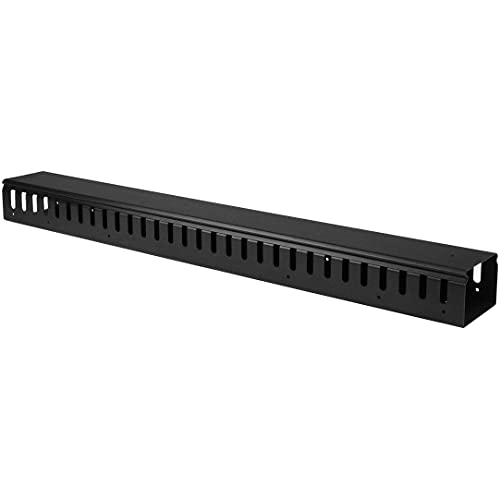
The CMVER20UF 0U finger duct includes a cover to keep cables tidy and protected while enabling passive cooling. It mounts to standard 19-inch racks and provides open-slotted fingers on both sides for flexible routing. Best for tidy, protected cable runs with straightforward installation. Caution: finger ducts may be less suitable for very heavy, high-density cabling projects without additional support.
Tudomro 10 Pcs Vertical D Ring Cable Management Rack

These D-ring cable organizers come in a bulk set of 10 pieces, offering mounting versatility with two mounting hole patterns. They are made of solid steel and sized about 2.4 x 4 x 4 inches. Best for larger cable bundles and for installations where users want to add multiple D-rings. Limitation: bulk kit may be overkill for small setups; ensure rack space supports numerous D-rings.
NavePoint 1 Channel Tooless Steel Vertical Duct 34 Inch

This 34-inch NavePoint vertical duct includes a snap hinge-fasten cable tray cover and mounts onto a standard 19-inch rack. Best for long cable runs in mid-sized racks where tool-less quick access is valuable. Caution: may require multiple units for full-height coverage in tall racks.
NavePoint 1 Channel Steel Vertical Duct 68 Inches

This 68-inch NavePoint vertical duct is designed for a single panel mounting on standard 19-inch racks, with a snap hinge-covered tray. Best for long reach in long rack runs requiring minimal components. Limitation: may need extra sections for complete coverage in very tall networks.
Buying Guide: Key Considerations For Vertical Cable Management
- Rack size and compatibility: Verify U-height and 19-inch standard mounting compatibility before choosing a duct or D-ring system.
- Access and maintenance: Front-access vs. full-height routes affect how easily technicians can reach cables during maintenance.
- Airflow impact: Open finger ducts and D-rings should promote airflow, but avoid obstructing intake vents or fans.
- Cable density and bend radius: Choose products that accommodate the number of cables and avoid sharp bends that can damage cables.
- Install complexity: Tool-less options speed up deployment; some setups may require simple tools for secure mounting in tall racks.
- Durability: Metal construction resists rust and wear; consider corrosion-resistant finishes for dense data-center environments.
Frequently Asked Questions
- What is a 0U vertical cable manager and who should use it?
Answer: A 0U manager mounts in the vertical space of a rack and does not occupy rack units. It’s ideal for users needing large-scale cable routing without consuming precious U-space. - When should I choose a finger duct versus a D-ring system?
Answer: Finger ducts are great for organized, accessible runs; D-rings excel at bundling individual cables with adjustable paths. - How can vertical cable management improve cooling?
Answer: By keeping cables neatly arranged away from heat-sensitive equipment and allowing air to flow more freely around hardware. - Are front-only models sufficient for all racks?
Answer: Front-only models work well when access is primarily from the front, but may limit rear cable routing in deeper cabinets. - Do these panels require tools for installation?
Answer: Some options are tool-free, while others may require basic mounting hardware; check product specifics before purchasing. - Can I mix different brands for a rack?
Answer: Yes, as long as mounting patterns and dimensions are compatible with the rack’s 19-inch standard.