
Best Vacuum on Off Switches for Power Tools
Answer: A vacuum-on/off switch helps synchronize dust collection with tool operation, preventing overloads and keeping workspaces cleaner. This guide highlights top options ideal for woodshops, garages, and DIY setups. Best for small-to-medium workshops, these switches automate vacuum operation to reduce dust and save time. Each product below is chosen for clear auto-on/off behavior, ease of installation, and reliable performance with common power tools.
Buyer summary table
| Product | Best For | Key Benefit | Notes |
|---|---|---|---|
| Ortis Automatic Vacuum Switch with Two Tool Outlets | Users with two tools and a vacuum | Auto delay prevents overload | Two fixing methods for installation |
| O’SKOOL Automatic Vacuum Switch | Table saw and router setups | 10-second delay off for dust clearing | Simple activation when tool draws >30W |
| SENCTRL Automatic Vacuum Switch | Load-sensitive operations | Manual Auto/On/Off modes | UL-certified cord and flame-retardant housing |
| SURAIELEC Vacuum Switch for 2 Tools | Dust collection with multiple tools | Auto/On/Off with 1.5s start delay | Wide compatibility (125V, 15A) |
| Ortis Adjustable Threshold Vacuum Switch | Customizable actuation | Configurable 30W/60W thresholds | LED indicators show mode and threshold |
Ortis Automatic Vacuum Switch With Two Tool Outlets

The Ortis switch provides two tool outlets and three vacuum modes: automatic, off, and on, with auto switching. Best for small shops where two tools run simultaneously with a single dust collector. The automatic delay helps prevent circuit overload and reduces airborne dust after starting. Installation offers screw-fastened or traceless wall-mounting options for versatility. Choose this if you need simple, two-tool compatibility in a compact setup.
Best for: woodshops needing two tools to run with one vacuum. Limitation: auto-delay may not cover extremely long tool cycles without manual adjustment.
O’SKOOL Automatic Vacuum Switch For Power Tools
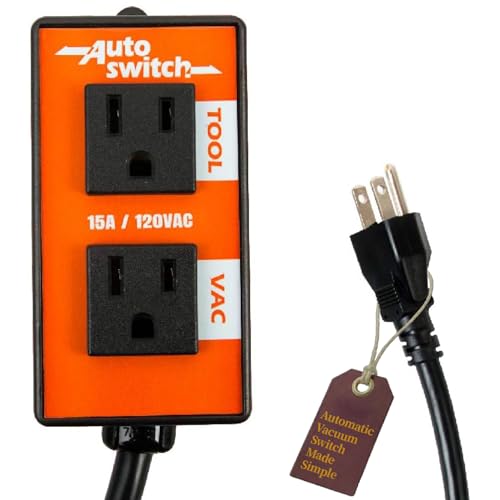
This switch auto-activates the vacuum when a tool starts and maintains vacuum for 10 seconds after the tool stops. It suits table saws, miters, routers, and dust collection systems. The design supports smooth dust collection in small shops and dashboards tool synchronization. Best for: users who want a predictable 10-second post-run purge. Limitation: may require a power tool drawing more than 30W to trigger the VAC outlet.
SENCTRL Automatic Vacuum Switch With Load Sensing

Featuring Auto, Off, and On modes plus load-sensing that prevents overloads, SENCTRL offers a manual override and a robust 14AWG cord. The device delays vacuum start by about 1 second if the tool’s load is high, helping protect circuits. Best for: workshops needing a manual/auto blend with safety features. Limitation: requires careful threshold setting to avoid nuisance starts.
SURAIELEC Automatic Vacuum Switch For Two Tools

With two tool outlets and Auto/On/Off modes, this switch starts the vacuum automatically in Auto mode and delays off for 7 seconds after tool stop. It supports a wide range of tools, from hand-held devices to large shop machines. Best for: multi-tool dust collection in compact garages. Limitation: the 1.5s start delay may feel short for longer tool warm-up cycles.
Ortis Adjustable Threshold Automatic Vacuum Switch
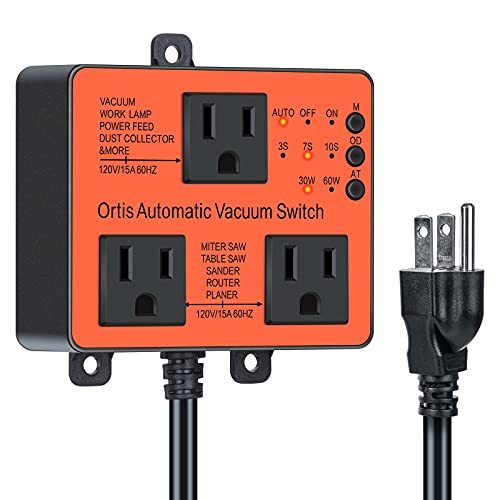
This Ortis model adds two tool outlets with three vacuum run modes (Auto, Off, On) and provides LED indicators for mode clarity. It allows configuring actuation thresholds at 30W or 60W and offers a configurable shutoff delay of 3s, 7s, or 10s. Best for: precise control of when the vacuum activates in relation to tool load. Limitation: setup requires selecting the right threshold for your tools to avoid frequent cycling.
Buying Guide
What should you consider before buying?
Shop layout: If you use two tools at once, prioritize switches with two tool outlets. If you have a simple setup, a single-outlet model may suffice.
Auto vs manual modes
Auto mode synchronizes vacuum with tool use, saving time and reducing dust. Manual On/Off gives you direct control for unusual tasks or silence when tools are off.
Delay and threshold settings
Look for adjustable delay times (e.g., 3s–10s) to balance dust clearance with noise. Threshold settings (30W/60W) help prevent accidental startup when a tool is idle or under light load.
Installation and compatibility
Two fixing methods (screw fastening and adhesive mounting) ease installation in various spaces. Check cable gauge (14AWG or similar) and voltage compatibility with your tools and shop vacuum.
Durability and safety
UL-certified components and flame-retardant housings improve safety in workshop environments. Ensure the unit supports your typical current draw and does not overheat during extended use.
Which one should you choose?
- Best for two-tool setups with straightforward wiring: Ortis Automatic Vacuum Switch with Two Tool Outlets.
- Best for table saws and routers in small shops: O’SKOOL Automatic Vacuum Switch.
- Best for load-sensitive operations needing manual control: SENCTRL.
- Best for multi-tool flexibility and long dust clears: SURAIELEC with Auto/On/Off modes.
- Best for customized threshold control: Ortis Adjustable Threshold model.
FAQ
- What is an automatic vacuum switch used for?
It links a vacuum to tools so the vacuum starts when a tool runs and stops after a delay, improving dust collection and protecting circuits.
- Do these switches require special wiring?
Most models are designed for standard workshop outlets and 125V circuits, but verify your tool draw and plug type before installation.
- Can I use these with any shop vacuum?
They are designed to work with common shop vacs that draw within the specified current range of the device.
- What happens if the tool draws a surge?
Many models feature load sensing and delay to prevent overload; excessive surges may require higher thresholds or a different switch.
- Is manual override important?
Yes, a manual On/Off mode adds control for tasks where you want the vacuum operating independently of tool usage.