
Best Surge Protectors Behind TV Setups for Clean Power
If you’re mounting a TV with a discreet power setup, a slim surge protector behind the television is essential. The right option protects your AV gear, streaming devices, and consoles from surges while keeping cords organized and out of sight. This guide highlights five versatile choices that fit behind TVs, under consoles, or in tight media areas. It targets buyers seeking wall-friendly, space-saving power strips with ample outlets and robust surge protection.
| Product | Best For | Key Benefit |
|---|---|---|
| Anker 11-in-1 Power Strip | Dorm rooms, home offices | Compact, flat plug, USB-C fast charge |
| One Beat 10-in-1 Outlet Extender | Small spaces with USB-C needs | Rotating plug, wide spacing for large adapters |
| Sanus 1080J Fireproof | AV setups and compact desks | Fireproof protection, low profile |
| Mount-It! In-Wall Concealer Kit | Professional-looking TV mounting | In-wall cable concealment, triple outlet |
| Anker 2100J Power Strip | Power-hungry media centers | High joule rating, multiple outlets, USB ports |
Anker 11-in-1 Power Strip with 2000J Surge
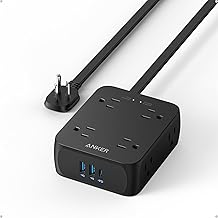
This 11-in-1 power strip packs eight AC outlets, two USB-A ports, and one USB-C port for a compact, behind-TV setup. The 2000J surge protection guards connected devices during voltage spikes, and the 20W USB-C port enables fast charging for compatible devices. Best for dorm rooms or small media centers where outlet space is at a premium. Caution: USB-C and USB-A ports share total power, so use higher-demand devices on individual outlets when possible.
Surge Protector Outlet Extender with Rotating Plug
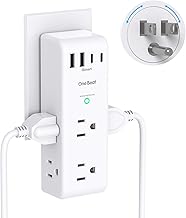
This 10-in-1 extender provides six AC outlets and four USB ports, including USB-C. The 180-degree rotating plug and wide-spaced outlets help fit bulky adapters without crowding. Best for compact media carts or desks where outlets must be accessible from multiple directions. Limitation: Read the manual for recommended load per outlet to avoid overheating when many devices charge simultaneously.
SANUS On-Wall Low Profile 1080J Surge Protector

With a slim 1.25-inch profile and six AC outlets, this SANUS model is designed for AV setups and tight spaces behind TVs. It offers three lines of protection, adding an extra safety layer beyond single-line protectors. Best for mounted TVs or slim media shelves where a discreet, dedicated power strip helps minimize clutter. Caution: Limited USB port options—it focuses on AC protection rather than USB charging.
Mount-It! In-Wall TV Cable Concealer Kit

This in-wall kit includes a recessed power outlet and a triple-outlet design with a 9-foot cord, designed for clean, professional TV setups. Best for renters or homeowners seeking a polished look without visible cables. This option emphasizes concealment and safety. Limitation: It requires some DIY work and is not a plug-in only solution, so installation care is essential.
Anker 2100J Power Strip with 12 AC Outlets

This model offers a broad outlet array—twelve AC outlets—plus one USB-C and two USB-A ports, delivering up to 15W shared USB output. It also features an 8-point safety system for surge, overload, and temperature protection. Best for power-hungry media centers or gaming setups behind a wall-mounted TV. Caution: The large footprint may not fit ultra-compact spaces; measure your area before purchase.
Buying Guide
What should I consider when choosing a surge protector behind a TV?
Look for low-profile designs that fit behind wall-mounted or slim TVs. Ensure the unit has adequate outlets for all devices (TV, soundbar, consoles, streaming devices) and a surge rating that matches your space’s needs. USB ports are helpful for charging phones or tablets without adding wall adapters.
How important is surge strength (joules)?
Higher joule ratings offer longer protection against power spikes. For home theater setups with multiple devices, a rating in the 1000–2000+ joules range is common and practical.
Should I prioritize USB-C charging?
USB-C is valuable for fast charging phones and compatible devices. If you own many USB devices, choose a model with USB-C plus USB-A ports and note the shared USB power limit.
Is wall concealment a priority?
For behind-TV installations, consider products designed for compact spaces, rotating outlets, or in-wall kits. Concealment helps keep cables organized and reduces visual clutter.
What about safety and protection features?
Beyond surge protection, seek devices with overload protection, temperature control, and fire-resistant materials. Look for multiple protection layers and clear indicators for power and grounding status.
How many outlets do I need?
Count all devices normally used in the area: TV, gaming console, streaming players, soundbar, and charging devices. A model with 8–12 outlets provides flexibility for future upgrades.
What are common drawbacks to watch for?
Some units share USB power across ports, limiting simultaneous charging speed. Large, bulky adapters can crowd neighboring outlets. Always verify the product’s dimensions and outlet spacing before purchasing for tight spaces behind a TV.
How should I plan installation?
Measure depth behind the TV and wall, consider the distance to a nearby outlet, and decide between a plug-in extender or an in-wall solution. Follow manufacturer instructions for safe mounting and avoid overloading a single outlet.
Quick comparison at a glance
- Best overall for behind-TV use: Anker 11-in-1 Power Strip (flat plug, USB-C fast charge, 2000J).
- Best space saver with rotating plug: One Beat 10-in-1 Outlet Extender (rotating plug, wide spacing).
- Best low-profile protection: SANUS 1080J Fireproof (slim, three protection lines).
- Best for clean concealment: Mount-It! In-Wall Concealer Kit (in-wall, triple outlet).
- Best for high outlet count: Anker 2100J Power Strip (12 outlets, strong USB ports).
FAQ
- Are surge protectors behind TVs safe to install? Yes, when installed according to the product’s instructions and electrical safety guidelines.
- Can I use USB-C chargers behind my TV? Yes, but monitor total USB power usage to avoid overloading shared ports.
- Is an in-wall kit better than a power strip behind a TV? In-wall kits offer a neater look but require DIY installation; power strips are plug-in and simpler.
- How many devices can a surge protector support behind a TV? It depends on the model, but most setups should cover the TV, streaming device, game console, and a soundbar.
- Do I need a high joule rating for a TV room? A typical TV room benefits from 1000–2000+ joules to protect multiple devices from spikes.
- Should I prioritize low-profile and space-saving designs? Yes, for behind-TV installations, a slim, space-efficient unit reduces cable clutter.