
Best Smart Locks for Door: Top Keyless Entry Solutions for Modern Homes
Smart door locks offer convenient, secure access without keys, combining biometric, PIN, and app-based controls. This guide highlights five reliable options for American homes, spanning fingerprint readers, Wi‑Fi connectivity, and remote monitoring. Each pick balances battery life, speed, and smart features to fit apartments, single-family homes, and busy households. Explore practical details, unlocking methods, and setup considerations to choose the best fit for your front door.
| Product | Brand |
|---|---|
| eufy Security Smart Lock C220 | eufy Security |
| SMONET Front Door Lock | SMONET |
| YHV Keyless Entry CA02 | YHV |
| eufy Smart Lock C33 | eufy Security |
| Philips WiFi Smart Lock With Handle | PHILIPS |
eufy Security Smart Lock C220: Fingerprint And Wi‑Fi Access

The eufy C220 combines fingerprint entry with built‑in Wi‑Fi for remote control via the eufy app. It supports keypad entry, physical keys, voice control with Alexa or Google Assistant, and Apple Watch integration. The lock advertises up to 8 months of battery life on eight AA batteries, minimizing maintenance. Real‑time notifications and event history help monitor access, while integrated eufy ecosystem support enables routine automation with other eufy devices.
SMONET Front Door Lock: Fingerprint, Auto Lock, And Bluetooth
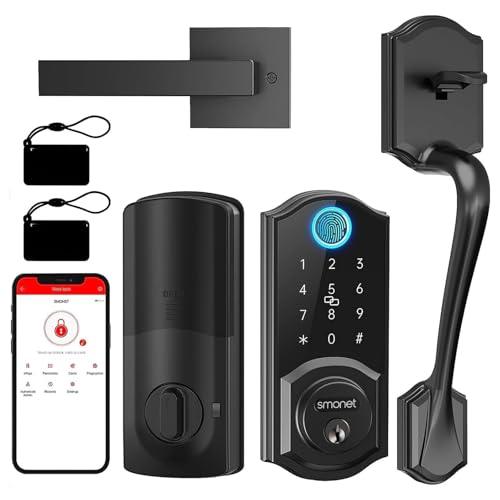
The SMONET 7‑in‑1 front door lock offers a wide unlock repertoire: anti-peep keypad, fingerprint ID, physical keys, fobs, smartphone app, and Bluetooth control. It supports Alexa and Google Home integration for voice control and can be remotely managed via a gateway. The unit uses a solid alloy body with multiple battery options and features auto‑lock settings to enhance security after entry. The fingerprint recognition is designed for quick access, often in under half a second.
YHV CA02: Code, App, Bio, And Voice Control
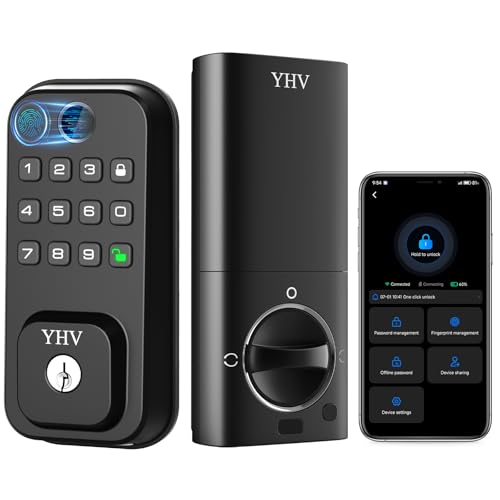
The YHV CA02 focuses on multi‑access unlocking with biometric fingerprint, app, password, physical key, and voice control via Alexa or Google Assistant. It supports up to 50 fingerprint groups for flexible access, and its fast 0.3‑second fingerprint sensor provides quick entry. No bridge is required for cloud access, making setup straightforward for home networks. Voice control provides hands‑free operation for occupants who want convenience and security in one device.
Philips WiFi Smart Lock With Handle
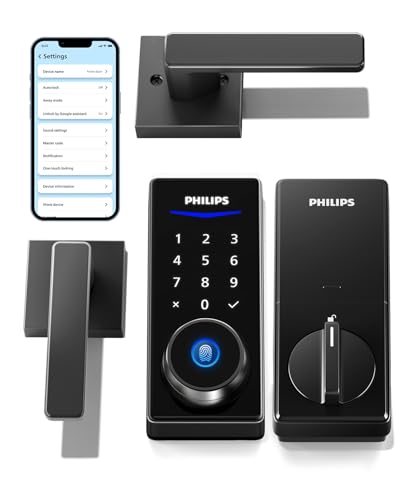
The Philips WiFi Smart Lock with Handle combines a lever handle with a fingerprint/keyless keypad and Wi‑Fi gateway included for remote access. It offers multiple unlocking methods, including app control, Bluetooth, and voice compatibility with Alexa and Google Assistant. Remote monitoring, access management, and unlocking records help homeowners track entry activity. The design integrates with Philips’ gateway ecosystem, enabling convenient, unified smart home control and auto‑lock functionality.
eufy Smart Lock C33: Handle Grip And Quick Access

The eufy C33 features a keypad with a handle for convenient use at the door. It includes Wi‑Fi for remote control and real‑time notifications, along with a fingerprint option for quick entry. The lock emphasizes a long battery life, with reports indicating extended operation between replacements. The integration with a broader eufy ecosystem supports coordinated smart home routines, especially for users already invested in eufy devices.
Buying Guide: Key Purchase Considerations
- Unlocking methods: Consider which combination of fingerprint, keypad, mobile app, and voice control best fits your daily routine and household members. A mix of biometric and code entry reduces the risk of lockouts.
- Connectivity: Decide between Wi‑Fi, Bluetooth, or bridge‑dependent setups. Wi‑Fi models offer remote access without a hub, but may require a gateway for full features.
- Battery life: If you prefer minimal maintenance, look for locks advertised with months of battery life and notifications for low power. Battery type compatibility also matters.
- Security and privacy: Check encryption standards, anti‑peep keypad designs, and activity logs. Some models integrate with broader ecosystems for automation but may raise data sharing questions.
- Installation and compatibility: Ensure the lock fits your door thickness, existing bore size, and lever or handle style. Some locks require professional installation, while others are DIY friendly.
- Voice assistant and smart home integration: If you use Alexa or Google Assistant, verify compatibility and supported routines. Consider whether you want to lock/unlock via voice or to trigger automation when you leave home.
- Upgrade path: If you already own a smart home hub or doorbell, choose locks that natively integrate with those devices to simplify management and reduce extra hardware.
- Warranty and support: Look for an extended warranty and accessible customer support, especially for battery and firmware updates.
When choosing a smart lock, prioritize real‑world usage: ease of entry for family and guests, reliable notifications, and a clear upgrade path into your existing smart home. The highlighted models provide a spectrum of options—from fingerprint‑first access to app‑driven control—to help homeowners balance convenience and security without sacrificing reliability.