As an Amazon Associate I earn from qualifying purchases. These links may earn this site a commission when you buy, at no extra cost to you.
Choosing the right power and data cables is crucial for reliable hard drive performance and long-term durability. This guide highlights top power cable options for HDDs, including SATA power splitters, standard power cords, and data cables that ensure stable connections across desktop and external setups. Each product is selected for compatibility, build quality, and practical use in everyday storage configurations.
| Product | Brand | Type | Key Benefit |
|---|---|---|---|
| 12V AC Power Cord | HAHEWEA | SATA power cord | Wide compatibility with WD drives and 12V output |
| SATA Power Splitter Cable 6 Way | Mbiydeg | Power splitter | Power up to 6 devices from one connector |
| HDD SATA Power Cable | Furlet | Mini 6-pin to 15-pin | Dell compatibility for certain desktops |
| SATA Data & Power Cable Kit | KETAWA | Data + power kit | High-speed data transfer with secure connections |
| Cable Matters SATA Power Extension Cable 3-Pack | Cable Matters | Extension cable | Flexible length and easy management |
HAHEWEA 12V AC Power Cord For WD External Drives
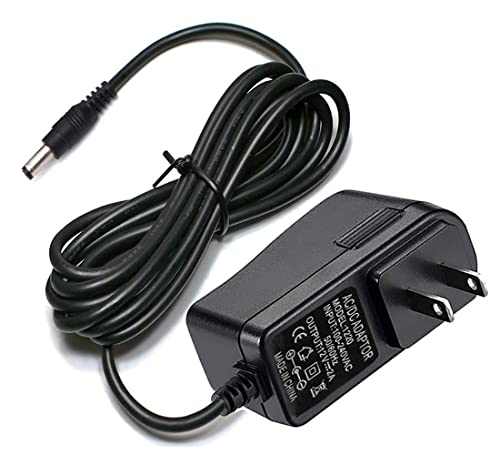
The HAHEWEA power cord is designed to support WD My Book Essential external drives and similar devices that require a 12V supply. It lists compatibility with multiple Western Digital models, including My Book and My Cloud series, and provides an input range of AC 100V-240V with a 12V 2A output. The 5-foot cable length adds flexibility for setups with external enclosures, media players, or network storage hubs. Note that it may not fit certain WD models, so users should verify their device’s model compatibility before purchase.
Mbiydeg 6-Way SATA Power Splitter Cable

This 6-way SATA power splitter converts a single 15-pin SATA power connector into six separate SATA power leads. It enables powering multiple HDDs, SSDs, or optical drives from a single supply while maintaining stable power delivery. The design emphasizes wide compatibility and consistent performance, making it useful in multi-drive desktop builds or small servers where space and cable management are priorities. Users should ensure their power supply can handle the cumulative load of all connected drives.
Furlet HDD SATA Power Cable (Mini 6-Pin to 15-Pin)

The Furlet SATA power cable provides a precise 15-pin SATA power connection through a Mini 6-pin ATX-style plug. It is marketed for Dell Inspiron desktops, aligning with several 3650/3653 series machines that require this adapter style. The cable’s durable black sheath supports longevity in daily use and reduces cable clutter by fitting with specific workstation configurations. Compatibility should be verified against the motherboard and power supply connector layout before purchase.
KETAWA SATA Data Cable & 15-Pin Power Splitter Kit
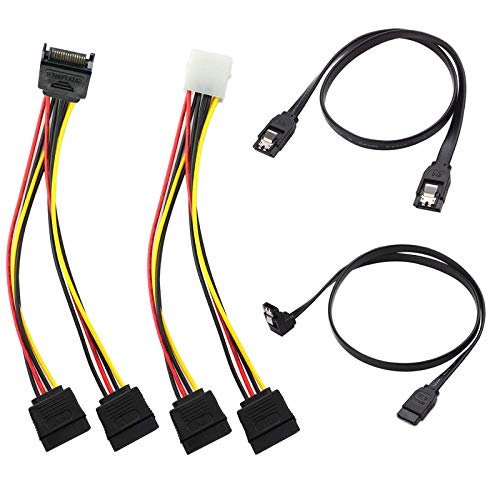
This all-in-one kit combines a high-quality SATA data cable with a 15-pin power splitter, designed to support storage expansion with reliable data transfer up to 6 Gbps. It features locking latches at both ends to ensure secure connections, which helps prevent accidental disconnections during file transfers. The kit is suitable for HDDs, SSDs, and optical drives, offering flexible options for tighter PC builds and external enclosures where space management matters.
Cable Matters 3-Pack SATA Power Extension Cables

This three-pack provides 12-inch SATA power extensions, enabling easier routing and cable management in desktop builds. The extensions are useful for extending connections to older drives or rearranging internal layouts to improve airflow. The cables are designed for compatibility with standard SATA HDDs, SSDs, and related devices, offering simple plug-and-play installation with secure connectors and comfortable grip edges for easy handling in tight PC cases.
Buying Guide: Key Considerations
- Compatibility: Check both connector types and device models to avoid mismatches (SATA data vs. power, 15-pin vs. 4-pin, etc.).
- Power Requirements: Ensure the power supply can handle the combined load of all connected drives, especially when using splitters or multi-drive extenders.
- Cable Management: Opt for cables with right-angle ends or shorter lengths where space is tight, and consider data cables with locking features for secure connections.
- Data Performance: For drives that demand high transfer rates, prioritize data cables rated for SATA III (6 Gbps) and minimize chain length to reduce signal degradation.
- Durability and Shielding: Look for well-built jackets and connectors that resist wear from frequent plugging/unplugging and present minimal impedance.
- Use Case: Distinguish between internal PC expansions, external enclosures, NAS setups, or simple backups, as this guides whether you need data cables, power splitters, or extension cables.
- Safety: Avoid using cables beyond their intended purpose (e.g., modifying cables for untested power configurations) to reduce risk to drives and power supplies.
In summary, selecting the right HDD power and data cables involves considering the number of drives, enclosure type, and overall system layout. The listed products offer a range of compatibility options from single-drive power cords to multi-drive splitters and data-enabled kits, helping users build stable, organized storage configurations.