
Best Power and USB Outlet Solutions for Home and Office
Looking for a reliable power strip with USB charging to keep devices organized and charged? This guide highlights five practical outlet extenders that pair multiple AC outlets with USB ports. Each option suits different setups—from dorm rooms to home offices—so you can pick the best fit for your devices and space.
Summary table of chosen products:
| Product | Best For | Key Feature |
|---|---|---|
| Wall Charger, Surge Protector, QINLIANF 5 Outlet Extender | Duplex wall spaces | 3-sided design with 4 USB ports |
| 5 Outlet Extender Multi Plug Wall Outlets | Small desks or dorm rooms | 4 USB ports, USB-C, ETL Listed |
| TOPGREENER 4.2A USB Wall Outlet (2 Pack) | Modern, clean look | IntelliChip 3-port charging |
| Surge Protector Outlet Extender with Rotating Plug | Hard-to-fit outlets | Rotating plug, 4 USB ports |
| Amico 6.0A USB Outlet | Safe, tamper-resistant outlets | 2 USB-C + 1 USB-A ports |
QINLIANF Wall Charger With 5 Outlets And USB Ports

Best for wall space with duplex outlets. This 3-sided design provides five AC outlets and four USB ports, allowing multiple devices to charge without blocking adjacent sockets. The USB-A ports deliver up to 2.4A each, while USB-C offers up to 3A. A built‑in wall-mount screw helps secure the unit to the outlet, reducing accidental pull-outs. Note: It secures to standard duplex outlets only and may not fit non-standard receptacles.
Who it’s best for: small home offices or living spaces where a wall-mounted, compact power hub is preferable. Why chosen: the configuration optimizes spacing for bulky adapters and includes USB-C fast charging compatibility. Caution: the unit requires a duplex outlet with adequate space between sockets; not compatible with every wall design.
5 Outlet Extender With USB And USB-C Ports

Best for dorm rooms or bedside setups. This 5-outlet extender adds four USB charging ports (one USB-C) and features an ETL-listed design suitable for interior use. It’s ideal when desk space is tight and you want a simple, wall-facing solution that eliminates extra cables. The USB-C port provides up to 3A max. Limitation: USB-C may not support very high-wattage devices simultaneously.
Who it’s best for: students or apartment dwellers needing a compact, compliant surge-resistant outlet with USB-C. Why chosen: clean wall plug design reduces desk clutter, with secure mounting options. Caution: ensure the unit is plugged into a standard grounded receptacle for safe operation.
Surge Protector With Rotating Plug And USB Ports
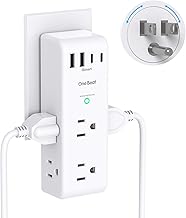
Best for tricky outlet layouts and travel. This 10-in-1 design combines six AC outlets with four USB ports, including two USB-C ports, and features a 180-degree rotating plug to fit awkward spaces. A protection light signals proper grounding. Caution: the device calls for careful manual reading; improper orientation could block adjacent outlets.
Who it’s best for: travelers or small offices needing flexible orientation and a compact footprint. Why chosen: rotating plug design handles tight spaces while providing USB-C ports for newer devices. Limitation: ensure total load stays within 15A to avoid tripping a circuit.
Amico 6.0A USB Outlet With Wall Plate

Best for homes prioritizing safety and modern USB charging. This unit includes two USB-C ports and one USB-A port with a total output up to 4.2A. It’s ETL listed and features tamper-resistant outlets, making it suitable for households with children. Limitation: not designed for laptops; best used for phones, tablets, and smaller devices.
Buying Guide: Key Purchase Considerations
- Number and type of outlets: Match the number of AC outlets and USB ports to your device mix. Consider USB-C if you frequently charge modern devices.
- Mounting and space: If wall-mounted installation is important, check back design and screw compatibility. Measure spacing between sockets to ensure bulky adapters fit.
- Surge protection rating: Look for joule ratings that align with device safety needs. Higher joule ratings generally offer stronger protection for sensitive electronics.
- Safety features: Tamper resistance, grounded outlets, and overcharge protection help prevent accidents and extend device life.
- Port management: If you have many USB devices, ensure ports offer adequate total output and avoid overloading a single port.
- Compliance and labeling: ETL or UL listings indicate compliance with safety standards. Verify product notes about compatibility with specific outlets.
Frequently Asked Questions
- What is the best USB charging port configuration for a desk setup? A combination of USB-C ports with at least one USB-A port generally covers a wide range of devices.
- Can I mount any power strip to the wall? Only if the unit includes a wall-mount design or provided mounting screws compatible with your outlet type.
- Do USB-C ports always charge faster? Not always; charging speed depends on device compatibility and port amperage. Look for 3A USB-C where possible.
- Is surge protection necessary for everyday devices? Yes, a surge protector protects sensitive electronics from voltage spikes and can extend device life.
- Are these units safe for dorm rooms? Yes, many are ETL-listed and designed for residential use, but always follow user manuals for proper installation.
- Will these work with laptops? Many USB ports are optimized for phones and tablets; choose units with higher total USB amperage if charging laptops is a priority.