
Best NFC Enabled Door Locks for Modern Homes and Smart Entrances
Looking for an NFC-enabled door lock that blends convenience with robust security? This guide highlights five top options that support NFC and other smart unlock methods. These models are suitable for busy households, tech-forward renters, security-conscious homeowners, and remote workers who want keyless access. Each option is evaluated for who it’s best for, how it unlocks, and practical considerations to help you choose.
Summary table of chosen products
| Product | Best For | Unlock Method Highlights |
|---|---|---|
| RUIKANG POWER WiFi Smart Door Lock | Homes needing fast biometric entry and multiple access modes | Biometric 0.3s, 2 NFC, 6 keys, App control, 0 hub WiFi |
| ULTRALOQ Upgrade Bolt NFC Smart Lock | Remote access fans who want built‑in WiFi without hubs | NFC unlock, built‑in WiFi, 6‑in‑1 keypad, remote control |
| Aqara Smart Lock U50 | Apple ecosystem users and Matter-compatible setups | Apple Home Key, remote passwords, Matter support |
| Veise VE029 WiFi Smart Lever Lock | Families and renters who want broad access options | 2.4 GHz Wi‑Fi, 0.2s fingerprint, 4 password types, remote control |
| Philips Wi‑Fi Door Lock | Users seeking voice control and broad app integration | App, passcode, fingerprint, voice via Alexa/Google, built‑in Wi‑Fi |
RUIKANG POWER WiFi Smart Door Lock

This 5‑in‑1 touchscreen deadbolt supports multiple unlocking methods, including 100 fingerprints, 100 passcodes, app control, 2 NFC cards, and 6 physical keys. It integrates with your home WiFi directly, eliminating the need for a hub. The biometric sensor promises 0.3‑second unlocking and a high recognition rate, enhancing quick entry for everyday use. This model is best for households prioritizing fast biometric entry and flexible access options, including remote control via a smartphone app. A potential caveat is that network stability is important to keep the WiFi wake feature reliable when you’re away from home.
Best for: Busy households that want a fast fingerprint unlock and multiple offline or online access methods. Consider this if you want a direct WiFi lock with no hub and you routinely share access with guests or family members.
ULTRALOQ Upgrade Bolt NFC Smart Lock

This lock emphasizes built‑in WiFi and Android NFC unlock, reducing the need for external hubs or extra devices. It supports remote locking and access sharing via a smartphone app, enabling you to grant temporary access from anywhere. The 6‑in‑1 feature set adds keypad entry and other options, making it versatile for households with varied access preferences. A limitation to consider is that NFC access may be more convenient with Android devices; Apple users might need alternative unlock methods or setup steps.
Best for: Homeowners who want convenient remote control and NFC access without an external hub. Choose this if you value remote management and diverse entry methods in one device.
Aqara Smart Lock U50

The U50 locks into Apple Home and supports Matter via Aqara’s hub, with options for remote password sharing and guest access. It offers multiple unlock methods, including a keypad and one‑time or temporary passwords, and supports third‑party ecosystems when paired with compatible hubs. Note that the NFC card is not included and must be purchased separately. This model is best for Apple‑centric homes or those aiming to integrate with Matter and smart home automations.
Best for: Apple users seeking native Home Key unlocking and deep HomeKit integration. Use this if you already use Aqara or plan to leverage Matter for broader smart home automations.
Veise VE029 WiFi Smart Lever Lock
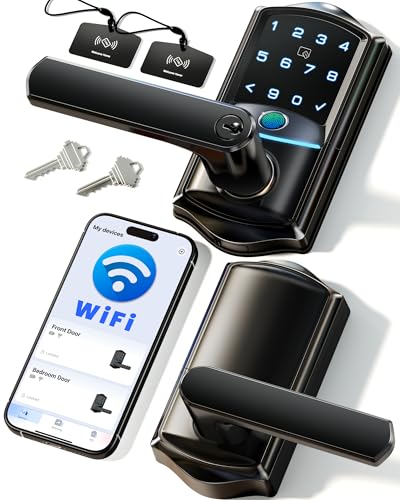
This lever lock emphasizes remote access via built‑in Wi‑Fi without a hub and features a fingerprint unlock in 0.2 seconds, plus support for IC cards, PIN codes, backups, and voice control with Alexa or Google Assistant. It is well suited for families needing multiple secure ways to grant access. A potential limitation is that the full feature set relies on stable network connectivity and app permissions; plan for good Wi‑Fi coverage at entry points.
Best for: Families and households that want rapid fingerprint entry alongside broad, customizable access options. Choose this if you value quick biometric entry and flexible permission sharing across devices.
Philips Wi‑Fi Door Lock

The Philips model combines multiple unlock options, including app control, fingerprints, passcodes, and voice commands via Alexa or Google Assistant. Built‑in Wi‑Fi enables remote locking and unlocking, supporting flexible family use whether you’re at work or on vacation. It notes that a 2.4 GHz network is required and a stable connection helps ensure reliable remote control. This lock is best for users who want broad voice assistant support and Apple/Android compatibility through a single app.
Best for: Households seeking broad smart home integration, especially those invested in voice control and unified app experiences. Avoid this if your Wi‑Fi is unstable or if you’re restricted to 2.4 GHz only in parts of your home.
Buying Guide: Key Factors To Consider Before You Buy
- Unlock methods: Do you prefer fingerprint, NFC, keypad, or app-based access? A mix of methods provides flexibility for all users.
- Connectivity: Do you want a hubless Wi‑Fi connection or a hub‑based Zigbee/Z‑Wave setup? Direct Wi‑Fi simplifies installation but may depend on home network reliability.
- Compatibility and ecosystems: Are you integrated with Apple HomeKit, Google Home, Alexa, or Matter? Ensure the lock supports your preferred ecosystem for automations and voice control.
- Security features: Look for high‑speed biometric recognition, anti‑tamper alerts, temporary access codes, and the ability to revoke permissions instantly.
- Installation and fit: Check door thickness, strike compatibility, and whether the lock is designed for interior or exterior doors. Some models are easier to install than others.
- Maintenance and reliability: Consider battery life, power options, and how the lock behaves during Wi‑Fi outages or router downtime.
- Privacy concerns: If using cloud APIs, review data handling practices and how access logs are stored and presented to you.
FAQ: Quick Answers For Buyers
- Q: Do NFC door locks require a dedicated app to unlock remotely? A: Many do require a smartphone app, but some also unlock via NFC tap for local entry and support remote control via built‑in Wi‑Fi.
- Q: Can I share access with guests without giving them a physical key? A: Yes. Most models support temporary or one‑time codes and guest sharing through apps.
- Q: Is a hub necessary for NFC and Wi‑Fi door locks? A: Some models work directly on Wi‑Fi without a hub, while others may use hubs or ecosystems for extended features.
- Q: Will these locks work if there is a power outage? A: Many rely on batteries, so they can operate during power outages, but some features may be limited when offline.
- Q: Are all NFC locks compatible with Apple and Android devices? A: Most support both platforms, but some features like Apple Home Key require Apple ecosystem compatibility.
- Q: What is a practical consideration for placement of these locks? A: Ensure strong Wi‑Fi signal at the door and check that the lock fits your door thickness and strike plate.