As an Amazon Associate I earn from qualifying purchases. These links may earn this site a commission when you buy, at no extra cost to you.
For a sleek, clutter-free viewing area, in-wall cable management helps you conceal power and AV cables behind the wall when mounting a TV. The following hand-picked options provide safe, code-compliant installations, with features like built-in outlets, USB charging, and included tools for a tidy, professional look. Each pick includes a quick-start overview and key benefits to help you compare at a glance.
Summary of chosen products:
| Product | Brand | Key Feature | Includes |
|---|---|---|---|
| ECHOGEAR In-Wall Cable Management Kit | ECHOGEAR | Pre-wired, ETL In-Wall Certified, tree-planting program | 6 ft extension cord, drywall hole saw |
| ECHOGEAR TV Cord Hider | ECHOGEAR | Dual outlets, low-voltage channel | Wall template, saw, six-foot cord |
| Perlegear Cord Hider | Perlegear | AC outlets + USB charging, UL/SGS certified | Templates, dust bags, drywall saw |
| PRLF In-Wall Kit | PRLF | Dual outlet with low-voltage brush pass-through | Drywall saw, extension cable, template |
| Mount-It! In-Wall Kit | Mount-It! | Triple outlet, recessed power, 9 ft cord | Hand saw, template |
id=”ECHOGEAR-First”>ECHOGEAR In-Wall Cable Management Kit for Power & Low Voltage Cords

Hide TV wires behind the wall with a straightforward, code-compliant solution. The kit is pre-wired and ETL certified for in-wall installation, designed to keep electrical work safe and tidy. Modules can be placed up to 5 feet apart to fit most entertainment setups. Includes a 6-foot extension cord and a drywall hole saw attachment, making installation easier for DIYers. For ongoing support, the company notes a plant-for-each-kit policy and a responsive support team seven days a week.
id=”ECHOGEAR-Dual-Outlet”>ECHOGEAR TV Cord Hider for Wall Mounted TV
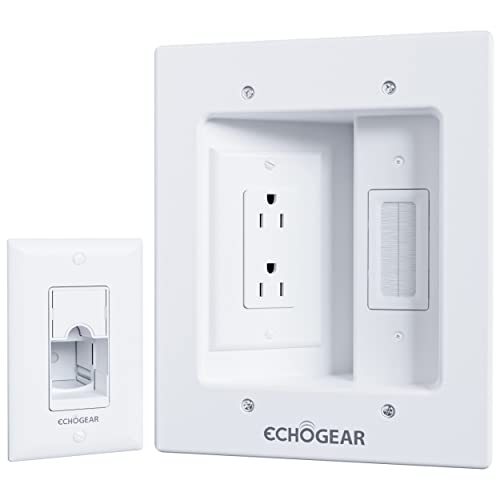
This dual-outlet, in-wall cable management kit is designed to power two devices and conceal low-voltage cables behind the wall. The package includes a full install kit with a wall template and a drywall saw, ensuring a precise fit. It supports multiple cords and keeps the TV setup clean, preventing clutter from HDMI, USB, and power lines. The kit is positioned as a no-wiring-needed solution for a straightforward DIY experience.
id=”Perlegear”>Perlegear Cord Hider for Wall Mount TV with AC Outlets

Designed to charge multiple devices simultaneously, this kit combines two AC outlets with USB-A and USB-C ports, ideal for powering the TV, streaming device, and lighting. UL and SGS certified, the unit uses fire-resistant materials and adjustable locking wings to secure the modules in place. It hides a variety of cables—HDMI, AUX, network, and more—behind the wall for a cleaner entertainment area while maintaining safe access to outlets.
id=”PRLF-2″>TV Cord Hider for Wall Mounted TV with Dual Outlet

Offers dual outlets and a built-in brush plate to tuck away low-voltage cables like HDMI and Ethernet. It emphasizes a minimum drywall opening and a clean feature set to hide both power and signal cables. The kit includes templates, a drywall saw, and hardware designed for a DIY-friendly install, making it accessible for renters and homeowners seeking a seamless wall-mounted TV aesthetic.
id=”Mount-It”>Mount-It! In-Wall TV Cable Concealer Kit

This kit focuses on an organized home theater setup with a triple outlet power path and a lengthy 9-foot cord for flexible placement behind the wall. It supports multiple HDMI, Ethernet, and A/V cables, allowing for a comprehensive in-wall solution without hard wiring. The package includes a drywall saw and a cutting template for an easy, renter-friendly installation that aims to deliver a polished, professional look.
Buying Guide: Key Considerations For In-Wall TV Cord Management
- Safety and compliance: Look for ETL/UL certification and in-wall rated components to minimize fire risk and meet local electrical codes. Consider whether the kit includes a ground fault circuit interrupter (GFCI) or relies on standard wiring methods.
- Power versus low-voltage separation: Some kits provide dedicated power modules with coax/HDMI pass-through, while others focus on brush plates and pass-through for low-voltage cables. Decide what mix suits your TV setup.
- Outlets and charging: If you plan to plug in multiple devices, dual outlets and USB ports offer convenience. Check outlet spacing to accommodate larger adapters and avoid blocking other sockets.
- Depth and wall compatibility: Ensure your drywall cavity depth meets the kit’s requirements (some require as little as 2.5 inches, others need more). Consider the thickness of your wall and existing insulation.
- Tools and installation: Kits with included templates and saws simplify the process. Verify whether you need any extra tools and whether the install can be completed in under 30 minutes or if professional help is recommended.
- Aesthetics and future upgrades: Some solutions allow flexible placement of modules and future reconfigurations. If you anticipate changing devices or mounting position, choose modular designs.
- Warranty and support: Check for customer support availability, especially for DIY installations. A responsive support team is valuable for troubleshooting and sizing questions.
- Environmental considerations: Some brands offer tree-planting programs or eco-friendly packaging—worth considering if sustainability matters to you.