
Best IDE to SATA Connector Solutions for Easy Drive Upgrades
Looking for a reliable IDE to SATA adapter or adapter kit? This guide highlights top options that convert IDE/PATA drives to work with modern SATA interfaces, or provide flexible dual-drive and power solutions. The best picks are suited for upgrading older laptops, restoring legacy desktops, data migration, and drive recovery. Below is a quick summary of five strong choices to consider, followed by detailed product sections and a practical buying guide.
| Product | Best For | Key Benefit |
|---|---|---|
| Xiwai SATA Female to IDE 44Pin Converter | Laptop and 2.5″ HDD/SSD users | Plug-and-play without extra cables |
| Unitek USB 3.0 IDE/SATA Adapter | Two-drive data migration and recovery | Dual-drive, USB 3.0, SATA III |
| CERRXIAN SATA Female to 40 Pin IDE Adapter | PC and older systems with PATA | Direct SATA to IDE conversion |
| SATA 2.5 Upgrade Adapter for PS2 | PlayStation 2 IDE upgrades | Simple upgrade path for PS2 HDD |
| SDTC Tech 4 Pin IDE Molex to 15 Pin SATA Power Splitter | Power needs for IDE drives | Dual power splitter for 3.5″ drives |
Xiwai SATA Female to IDE 44Pin Converter Adapter

The Xiwai converter is designed for 2.5-inch drives, converting a SATA interface to a classic 44-pin IDE connection. Best for laptop users and small form factor setups that still rely on IDE for older HDDs or SSDs up to 500GB. It is a plug-and-play solution that does not require external power or drivers; the 44-pin IDE connector provides powered operation for the drive without additional cables. A suitable choice for users wanting quick access to legacy data on newer machines.
Who it’s best for: travelers, students, or professionals upgrading older laptops or small desktops who need a simple, driver-free adapter. Limitations: does not support hot-swapping and may be unsuitable for drives larger than 500GB.
Unitek USB 3.0 IDE/SATA Adapter, Dual-Drive

This dual-drive adapter supports one IDE and one SATA drive simultaneously, including 2.5″/3.5″ HDDs and SSDs, plus optical drives. It uses USB 3.0 with SATA III to deliver higher transfer rates for data migration, backups, or drive recovery. A practical choice when you need to move data between mixed-drive types quickly. It’s more versatile for multi-drive projects but requires a stable 12V power supply for reliability when running two drives, especially with 3.5″ IDE HDDs.
Who it’s best for: IT professionals, home users performing frequent data migrations, and anyone who needs to access multiple drive types at once. Caution: ensure the included 12V/2A power adapter is connected during dual-drive use to avoid power-related drops in performance.
CERRXIAN SATA Female to 40 Pin IDE Adapter

This adapter converts SATA to the classic 40-pin IDE interface and includes a standard 4-pin Molex power connection. It enables older PCs to read SATA drives by bridging the two technologies. It is useful for upgrading older desktops or integrating SATA drives into legacy systems that still use PATA interfaces. A clear pick for bridging generations of storage interfaces.
Who it’s best for: users upgrading legacy desktops or re-purposing a SATA drive in a PATA-only system. Limitation: the adapter does not provide SATA-to-IDE for all modern features; performance depends on the host system’s compatibility with the older interface.
SATA Upgrade for PS2

The Sony PlayStation 2 upgrade adapter is designed for upgrading the PS2’s IDE hard drive via a SATA interface, enabling simple data transfers and storage expansion within the console ecosystem. It’s a targeted solution for PS2 enthusiasts seeking an easier HDD upgrade path. A practical pick for retro gaming setups that want to continue using a modern storage interface.
Who it’s best for: gamers or retro enthusiasts upgrading a PS2 to an IDE-to-SATA path. Caution: the product description indicates compatibility with specific PS2 models and setup conditions; verify your console model before purchasing.
SDTC Tech IDE Power Splitter
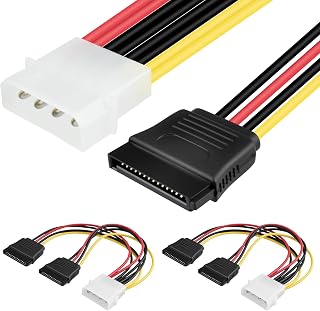
This power splitter helps provide the necessary power for IDE drives when using adapters that require a Molex-to-IDE or similar power route. It’s helpful in setups where a single power rail must support multiple drives. Choose this if your device needs extra power stability for IDE drives. Limitation: it does not supply data connectivity by itself; you still need a separate data adapter to access the drives.
Buying Guide: Choosing the Right IDE to SATA Connector
- What is your primary use? Data migration, drive recovery, or legacy system compatibility? Pick adapters that explicitly support your scenario (dual-drive, PS2 upgrade, or laptop HDD access).
- What drive type and size do you plan to use? Ensure the adapter supports your drive’s form factor (2.5″ vs 3.5″) and capacity (some devices target up to 500GB).
- Power considerations. Many IDE drives require external power; some adapters include power cables, while others rely on the host or a bundled power adapter. Verify requirements for 3.5″ drives.
- Connector compatibility. If you need to connect SATA drives to a PATA/IDE system, ensure the adapter bridges SATA to IDE with the correct 40-pin or 44-pin interface.
- Ease of use and driver needs. Most of these adapters are plug-and-play and do not require drivers, but some configurations may benefit from USB connections for hot-swapping or quick access.
- Portability and setup. For on-the-go use with laptops, a compact, driver-free solution is advantageous. For desktop use, a dual-drive dock or robust power supply can improve reliability.
Frequently Asked Questions
- Can I use these adapters with modern desktops? Yes, many adapters connect SATA or IDE drives to USB or internal SATA, depending on the model and host compatibility.
- Do I need drivers for these adapters? Most are plug-and-play and do not require drivers; some USB-based adapters may rely on the operating system for basic storage access.
- Will these work with large-capacity HDDs? Capacity support varies by model; check product specifications to confirm compatibility with your drive size.
- Is power supply necessary for all drives? Not always. 2.5″ drives often draw less power; 3.5″ drives typically require an additional power source for reliable operation.
- Are these adapters hot-swappable? Most are not designed for hot-swapping. Power down the host before connecting or swapping drives unless the product explicitly supports hot-swapping.
- Which option is best for data recovery? A dual-drive USB adapter like Unitek can simplify recovery by letting you access multiple drives without swapping cables.