
Best Clocking in and Out Machines for Small Businesses in 2026
Finding the right clocking in and out machine hinges on matching the device’s verification methods, data handling, and payroll integration with your business needs. This guide highlights five top options that suit small teams, remote locations, or mixed shift environments. Each product prioritizes attendance accuracy, user-friendly setup, and flexible reporting. Best for payroll-heavy operations, best for networks, and best for budget-conscious shops are covered.
| Product | Best For | Key Strength |
|---|---|---|
| NGTeco Time Clock for Small Business (4-in-1) | Small teams needing multi-factor verification | 4-in-1 verification: Face, Fingerprint, RFID, PIN |
| NGTeco APP Time Clock (Fingerprint & PIN) | Real-time scheduling with app control | Auto time tracking and real-time shifts |
| KUIIYER 3 in 1 Time Clock | Mid-size teams with 3 punching options | Face, Palm, PIN; large user capacity |
| ANVIZ CX3 Time Clock | Plug-and-play, no software | No monthly fees; USB transfer |
| Rabitpos 4 in 1 Time Machine | Eco-friendly offices needing flexible punches | Face, Palm, Fingerprint, PIN |
These selections emphasize reliability, ease of use, and practical data export options. The choices also consider potential limitations like biometric sensitivity to environmental conditions, or the need for ongoing app connectivity. Use the buying guide and FAQs to compare deeper, practical factors such as integration with payroll and data export formats.
NGTeco Time Clock for Small Business
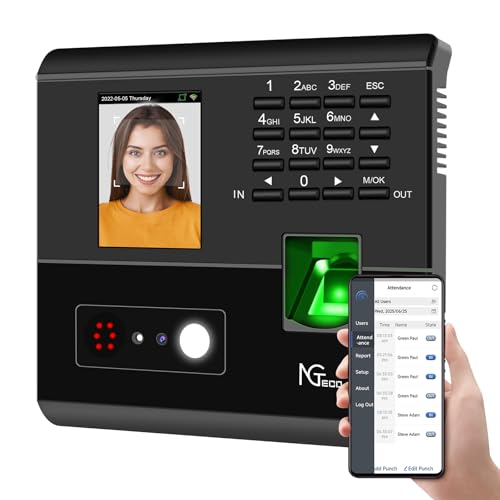
Best for businesses seeking 4-in-1 verification, this unit covers facial recognition, fingerprint, RFID card, and PIN. It auto-calculates work hours to reduce payroll errors and claims lower daily admin costs. It also supports remote control via the NGTeco app and offers flexible shift management for varied schedules. The device is ideal for shops that want reliable punch data without manual corrections. A potential limitation is the dependency on a compatible app for full remote management, which may require initial network setup.
NGTeco APP Time Clock with Fingerprint
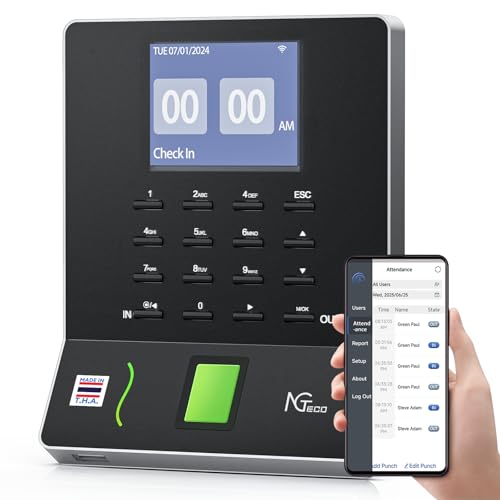
Best for teams needing real-time scheduling and smooth app control, this clock emphasizes streamlined shift management and auto time tracking. It offers fast fingerprint recognition and straightforward export options for payroll, making it well-suited for operations with rapid turnover or 24/7 coverage. Choose this if you want quick clock-ins with minimal setup and strong real-time visibility. A limitation is that some features rely on the pairings with mobile apps, so initial device pairing should be tested.
KUIIYER 3 in 1 Time Clock
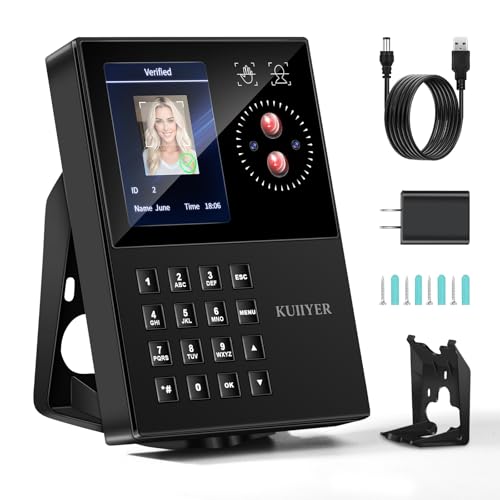
Best for businesses needing multiple biometric options in one footprint, the KUIIYER unit supports Face, Palm Print, and PIN, with a large capacity for users and records. It provides swift recognition (0.6 seconds in some cases) and accommodates up to 1,000 users across 16 departments and 24 shifts. It’s a strong pick for companies that want redundancy across biometric means. Note that palm recognition can be sensitive to lighting and positioning, so consider placement that ensures steady captures.
ANVIZ CX3 Time Clocks

Best for a “no-setup” experience, the ANVIZ CX3 clock emphasizes USB-based transfers without software or internet needs. It’s ideal for small businesses that want straightforward punching with no recurring costs. It supports fingerprints, PINs, and RFID, with the convenience of direct USB data transfers. A potential limitation is that it recommends indoor placement to maximize fingerprint reliability in varying climates.
Rabitpos Employee Time Clocks
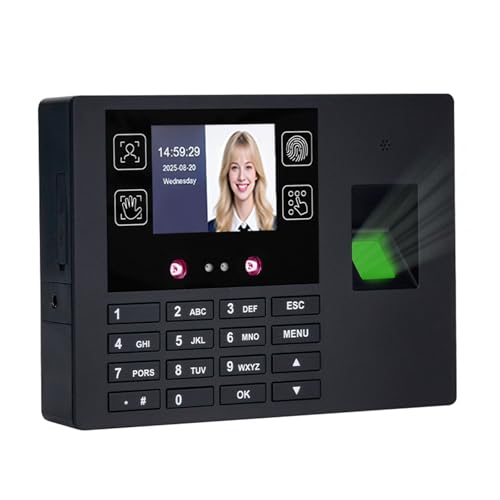
Best for offices aiming to reduce paper and improve data security, Rabitpos offers four punching methods: Face, Palm Print, Fingerprint, and PIN. It emphasizes eco-friendly operation and simple USB-based report extraction. Suitable for teams prioritizing digital records over physical time cards. A caveat is biometric performance in dim environments; ensure proper lighting and camera angles for reliable recognition.
Buying Guide
- What verification methods does your team need? If you require multiple options, prefer 4-in-1 devices (face+fingerprint+PIN+card) to reduce buddy punching and payroll disputes.
- How will data be exported and used? Look for devices with straightforward USB or app-based exports, compatible with your payroll software or spreadsheets.
- Is offline operation acceptable? Some environments require offline clocks with later sync. Decide if WiFi or cloud depending on reliability and IT support.
- Do you need no monthly fees? Several models advertise no ongoing costs. Confirm what “no monthly fee” covers (software, updates, or cloud features).
- What is the expected user capacity? Ensure the device supports your current headcount and future growth, including the number of shifts and departments.
- Where should the device be placed? Biometric accuracy depends on lighting and positioning. Place sensors at comfortable heights and in well-lit, stable locations.
- How critical is real-time data access? If real-time visibility matters, choose a model with app control and instant reports over traditional USB-only models.
FAQ
- What is buddy punching, and how do these devices prevent it? Buddy punching occurs when one employee clocks in for another. Multi-factor verification (face, fingerprint, palm, RFID, PIN) makes it harder to impersonate colleagues.
- Can I use these devices without internet? Several options support offline use with local data storage and later syncing, while some require WiFi for app features. Verify for the exact model.
- What should I consider when exporting attendance data? Look for standardized formats (CSV/Excel), and ensure you can export by date range, employee, and shift.
- Are these devices suitable for night shifts? Yes, many provide fast recognition and flexible shift settings, but palm or face sensors may be less reliable in very dim lighting unless the unit includes good ambient illumination.
- Is no monthly fee a real saving? Most no-monthly-fee devices still require occasional software updates or USB transfers; confirm what is included in the “no monthly fee” claim.
- How many users can these clocks manage? Capacity varies; match the device to your current employee count and potential growth, plus the number of departments and shifts.