
Best 6-Pin Power Cords for Smart Desks and Radios
Secure, reliable 6-pin power cords are essential for maintaining smooth operation of smart desks, lifting columns, and various radio and device setups. This guide highlights five top options, clarifying who each cord is best for and why it stands out. Use cases range from standing desk systems to professional radio setups, with clear cautions where to avoid potential fit issues.
| Product | Best For | Key Benefit |
|---|---|---|
| Litbla 6-Pin Male to Male | Smart desks with dual-motor columns | Flexible 2m length for tidy lifting paths |
| Litbla 6-Pin Male to Female | Controllers to lifting columns | Secure male-to-female connection with adjustable length |
| SLLEA 6-Pin DIN AC/DC Adapter | External drives and mains voltage devices | Worldwide voltage input and protective features |
| Anina 6 Pin 12AWG DC Cord | Radio and CB setups requiring higher current | High-gauge cable with fuse for safety |
| Urnqowuy 6-Pin Power Control Cable | Smart desks with 5557 connectors | Long, flexible, and protection-rich |
Buyer profiles: the desk professional prioritizes height-adjustment reliability; hobbyists need compatibility with existing 6-pin connectors; and radio enthusiasts require robust gauge and fuse protection. The following product-focused sections provide objective comparisons to help select the right cord for your setup.
Litbla 6-Pin Male to Male 2M Desk Connection Cable

This 6-pin male-to-male cable is designed for smart desks with a lift column to control box connection. The 2-meter length helps keep the lifting path clear, reducing the risk of cords snagging or being pulled out during operation. It is best for users with standing desks where the motor and controller use a male-to-male interface.
Best for: users needing a direct male-to-male link without adapters, especially in taller desk configurations. The longer length supports flexible desk positioning. Limitation: cannot replace with male-to-female configurations, so verify connector type before purchase.
Litbla 6-Pin Male to Female Desk Cable
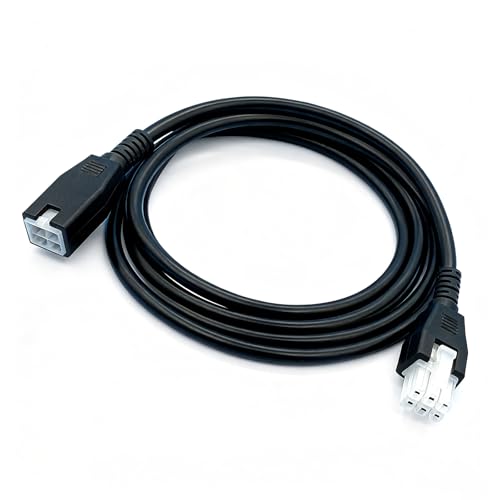
This 6-pin male-to-female cable connects lifting columns to a control box or controller. The 2-meter extension helps maintain tidy lines during height adjustments, making it a strong choice for desks with centralized control boxes. It’s best for setups requiring a secure male-to-female link.
Best for: users who need a reliable connector from the column to the controller. Caution: ensure your system uses a male-to-female configuration, as this cable cannot substitute for other plug types.
SLLEA 6-Pin DIN AC/DC Adapter Cable

This DIN-rated power adapter cable supports 100–240 VAC input and provides flexibility with a 4-foot length. It is CE certified and offers overvoltage and overheat protection, which is suitable for devices that rely on stable mains power and require safety protections. Best for: devices with universal mains compatibility and a need for protection features.
Limitation: confirm that your device’s model matches the listed configuration to avoid incompatibility.
Anina 6 Pin 12AWG DC Power Cord

This 12 AWG DC power cord includes a 30A fuse and is designed for higher-current applications like certain Yaesu and Kenwood radio models. The cable accommodates multiple radio configurations and is suitable for professionals needing robust power delivery to ensure consistent operation.
Best for: users with radio or CB setups requiring higher current capabilities and fuse protection. Caution: verify that your specific model supports a 6-pin DC configuration and fuse requirements before purchasing.
Urnqowuy 6-Pin Power Control Cable

Urnqowuy offers a 6-pin power control cable with a 5557 rotating female connector. At 4.9 feet (about 1.5 meters), it provides ample reach for desk setups and reduces tension on cables during lifting. It includes safety features to protect both the motor and the connected devices.
Best for: desks with 5557 connectors and users needing extra cable length for flexible desk positioning. Limitation: ensure compatibility with your desk’s controller and connector style, as not all systems use the same 5557 interface.
Buying Guide: Key Purchase Considerations
- Connector compatibility: Confirm the exact pin configuration (male vs female) and the connector type (5557, DIN, etc.) to ensure a proper match with your desk controller, motor, or device.
- Cable length: Consider the desk height range and movement clearance. Longer cables reduce tension but may add excess slack; shorter cables reduce clutter but limit range.
- Current and voltage specs: For power-heavy devices, select cables rated to handle the required current with appropriate voltage compatibility.
- Protection features: Look for overvoltage, overcurrent, and short-circuit protections to safeguard motors and electronics in lift systems or radios.
- Durability and shielding: For environments with movement or vibration, choose cables with robust insulation and shielding to minimize wear and signal loss.
- Manufacturer compatibility: Some cables are designed strictly for specific models or brands. Verify any model notes or listing details before purchasing.
FAQ
- What is a 6-pin power cord used for?
These cords connect devices with 6-pin connectors, such as smart desk lift systems and certain radio or controller setups, to power or control modules.
- How do I know if a 6-pin cord fits my desk?
Check your desk’s controller and motor documentation for the connector type (male vs female) and the pin arrangement, then match the listed cable configuration.
- Are there safety features I should look for?
Yes, look for overvoltage, overcurrent, and short-circuit protection to reduce the risk of motor or controller damage.
- Can I replace a 6-pin cord with a different pin setup?
No. Replacing a 6-pin male-to-male with a male-to-female or other configuration can cause incompatibilities or damage. Use the exact configuration required by your device.
- Which cord is best for a high-motion desk?
A longer, thicker-gauge cord with good strain relief and protective features is preferable to handle frequent lifting without stressing connections.
- What should I do if the connector type is unclear?
Consult the device’s manual or contact the manufacturer’s support to confirm the exact 6-pin configuration before purchasing.