
Best UPS With USB Ports for Home Office Devices
Looking for an uninterruptible power supply (UPS) with USB ports to keep essential devices running during outages? This guide highlights five reliable options, focusing on models with USB charging, surge protection, and multiple outlets. Best for home offices, small businesses, and network setups needing continuous connectivity; each pick addresses common power glitches and device protection needs.
Overview at a glance: the table below summarizes the five products chosen for this guide, including who they’re best for and why they stand out.
| Product | Best For | Why It Stands Out |
|---|---|---|
| APC BE600M1 | Basic home office setups | Compact, budget-friendly with multiple outlets and USB charging |
| CyberPower CP1500AVRLCD3 | Power users with longer runtime needs | Large capacity, LCD status, AVR, and multiple USB ports |
| APC BR1000MS | Home office and media centers | Sinewave power, LCD, USB-C/USB-A charging |
| SKE VL625 | Small offices and networking gear | 7 outlets, AVR, USB-C, compact form |
| CyberPower SL950U | Slim profile setups | Balanced backup with USB ports and versatile outlet mix |
APC UPS Battery Backup for Power Outages (BE600M1)

Best for compact setups needing reliable basic backup and surge protection. The BE600M1 supplies short-term battery power during outages and keeps essential devices online long enough for safe shutdown. It includes five battery-backed outlets and two surge-only outlets, supporting a computer, Wi-Fi router, and desk devices. The unit offers USB charging to keep auxiliary devices ready during outages. Limitations include a shorter runtime at higher loads, making it less ideal for power-hungry equipment.
CyberPower ST625U Standby UPS (625VA/360W)

Best for smaller home offices or media setups needing surge protection alongside USB charging. The ST625U offers eight outlets—four with battery backup and surge protection, four surge-only—and two USB ports for charging. It uses a standby design suitable for PCs, routers, and streaming devices. Choose this if you want a cost-efficient, low-profile UPS with flexible outlet arrangement; beware that its runtime is modest at higher loads.
CyberPower CP1500AVRLCD3 Intelligent LCD (1500VA/900W)

Best for users needing substantial runtime and detailed power information. The CP1500AVRLCD3 features 12 outlets, six with battery backup, an AVR for voltage stabilization, and a color LCD panel showing real-time battery and input status. It includes USB ports (Type-A and Type-C) to rapidly charge devices. This model is well-suited for workstations, routers, and media hubs. Limitations include its larger footprint and higher cost compared to smaller models.
SKE VL625 625VA/360W UPS

Best for home offices with moderate device loads and network gear. The VL625 provides seven outlets, including five battery-backed and two surge-only outlets, plus USB and Type-C charging. Built-in AVR helps stabilize voltage, supporting stable delivery to PCs and routers. The compact design makes it a good fit under desks. A potential limitation is the smaller battery capacity relative to larger models, which reduces runtime at high loads.
APC UPS Back-UPS Pro 1000VA Sinewave (BR1000MS)
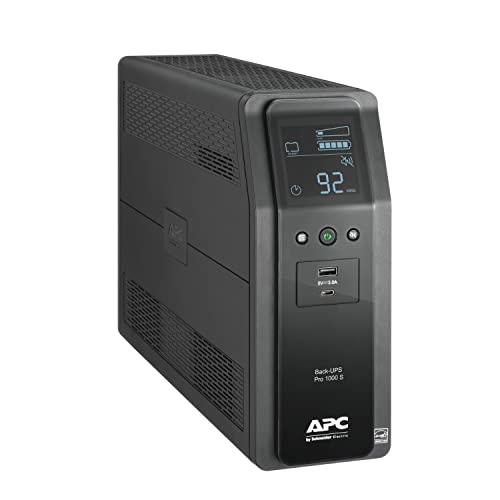
Best for mid-range power users needing clean sinewave power for sensitive electronics. The BR1000MS provides up to 12 minutes of runtime at 300W, supports devices like computers, NAS drives, TVs, and routers, and offers USB-C and USB-A charging. It uses sinewave output to reduce stress on connected hardware. Choose this if you require higher-quality power with a larger LCD for status, but be mindful of its higher price and size compared to basic models.
APC BVK750M2 UPS (750VA)
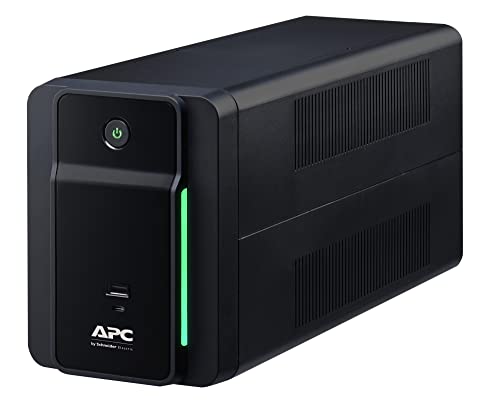
Best for compact home offices requiring essential backup with USB charging. The BVK750M2 delivers 750VA/410W and four battery-backed outlets plus USB charging ports. This line-interactive UPS provides AVR to handle voltage fluctuations and ensures that essential devices stay on during outages. It is a balanced choice for space-conscious setups, though it may offer shorter runtime under heavier loads compared to larger units.
Buying Guide
- What load do you need to back up? Calculate total wattage of essential devices to choose a UPS with enough VA/W to support them.
- How long should the runtime be? If you need several minutes to save work, pick a model with higher watt-hour capacity or long-run capability.
- Do you require AVR? Automatic Voltage Regulation helps stabilize voltage swings, protecting sensitive equipment.
- What ports are needed? Consider the mix of battery-backed and surge-only outlets and ensure USB-C/USB-A ports meet device charging needs.
- Is the form factor important? Slim or compact models are easier to place under desks, while larger towers suit dedicated equipment rooms.
FAQ
- What is a UPS with USB ports best for? It provides battery backup and charging for devices like computers, routers, and mobile gear during outages.
- How do I choose the right UPS capacity? Compare total wattage of devices and pick a unit with at least 20–40% more capacity for headroom.
- What is AVR and why is it important? AVR stabilizes voltage to prevent spikes and drops that could damage electronics.
- Do all UPS units have USB charging? Many do, but verify the number and type (USB-A, USB-C) to ensure compatibility with your devices.
- Can I use a UPS for a gaming setup? Yes, especially models with higher VA/W and AVR, which protect gear during outages and fluctuations.
- How long will a UPS keep devices running? Runtime depends on load and battery capacity; higher-end models offer longer runtimes at similar loads.