
Best Zigbee No Neutral Switches for Effortless Smart Lighting
The best Zigbee no-neutral switches provide reliable, wire-saving smart lighting control for homes without neutral wiring. This guide highlights five top options, explaining who each is best for, and why they stand out. Perfect for homeowners upgrading older wiring, renters, and those seeking compact, easy installs with voice control. A quick comparison table is below for fast reference.
| Product | Key Benefit | Best For |
|---|---|---|
| Zigbee Smart Switch No Neutral (1 Channel) — RP Series | Consistent design across outlets; no-neutral installation | Homes needing consistent look and single-pole control |
| Aqara Smart Light Switch No Neutral (1 Gang) | Remote control with Aqara hub; strong automation | Users already using Aqara ecosystem |
| SONOFF ZBMINIL2 Zigbee Mini Switch (4 Pack) | Ultra mini, no neutral; 2-way capable | Compact installs across multiple rooms |
| Aqara Zigbee Wireless Mini Switch | Versatile 3-way control with Aqara hub | Hub-integrated multi-location control |
| SONOFF ZBMINI Zigbee Smart Light Switch | Tiny size; no neutral; supports external switches | Small mounting boxes; flexible wiring |
Zigbee Smart Switch No Neutral Required — 1 Channel

Best for first-time Zigbee upgrades in homes with single-pole lighting and no neutral wiring. This model (RP-ZB-S01) focuses on a consistent rocker paddle look across RP series devices, simplifying future expansions. It requires a Zigbee hub and works with voice assistants through compatible apps. The single-pole design makes it ideal for rooms where a simple on/off control is needed without modifying wiring.
- Best for: users who want a uniform look across a home and straightforward single-pole control.
- Why chosen: no-neutral installation keeps wiring simple in older houses.
- Limitation: not suitable for 3-way configurations.
Aqara Smart Light Switch No Neutral (Single Rocker)
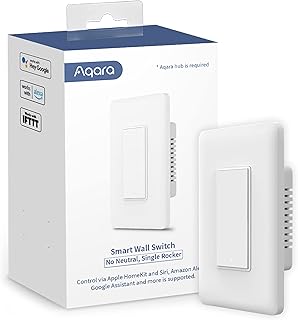
Best for Aqara ecosystem users seeking deep automation and HomeKit compatibility. This switch requires an Aqara Hub and supports remote control and scheduling via the Aqara Home app. It handles up to 600 W (incandescent) or 200 W (LED/CFL) per way, making it suitable for standard lighting circuits. Note: hub compatibility and local network setup are essential for full functionality.
- Best for: homes already using Aqara hubs or planning to expand with Aqara devices.
- Why chosen: strong automation options and broad HomeKit compatibility when paired with Aqara hub.
- Limitation: requires Aqara Hub and specific network configuration.
SONOFF ZBMINIL2 Zigbee Smart Switch (No Neutral, 4 Pack)

Best for multi-room setups needing a compact, no-neutral switch in a 4-pack. The ZBMINIL2 provides 2-way control, fits behind most standard wall boxes, and remains unobtrusive with a small footprint. It is ideal for retrofits in older homes or apartments where space is limited. Consider this option if you want consistent, simple installation across several rooms.
- Best for: installing in multiple rooms without altering existing wiring significantly.
- Why chosen: ultra-mini design fits behind standard switches; no neutral required.
- Limitation: requires a Zigbee hub for operation.
Aqara Zigbee Wireless Mini Switch

Best for flexible control in a hub-centered system. This Aqara wireless mini switch supports 3-way control configurations and is designed for quick setup with an Aqara hub. It enables single press, double press, and long-press actions that can trigger scenes or device control. It is particularly suited for wall-mounted convenience in living rooms or bedrooms.
- Best for: users who want versatile 3-way control within Aqara’s ecosystem.
- Why chosen: supports multiple press actions and tailored scenes via Aqara hub.
- Limitation: requires Aqara hub and specific hub-to-router proximity considerations.
SONOFF Zigbee Smart Light Switch No Neutral

Best for compact installs in tight spaces with external switch compatibility. The ZBMINI Zigbee switch is designed to fit in small mounting boxes and works with various external wall switches. It supports no-neutral installation, which makes it a practical choice for retrofits where changing existing wiring is impractical. Choose this option when space is limited and you want to preserve existing switch wiring.
- Best for: small boxes and retrofits where space is at a premium.
- Why chosen: ultra-tiny size with broad external-switch compatibility.
- Limitation: relies on Zigbee hub and may require additional wiring considerations for complex setups.
Buying Guide
Which Zigbee no-neutral switch is right for you depends on your home setup and ecosystem:
- Hub compatibility: Ensure you have a Zigbee hub (or your existing hub ecosystem) that supports the chosen switch and desired automations.
- Wiring and location: No-neutral switches are ideal for older homes; confirm single-pole vs. 3-way if you plan to upgrade multiple switches.
- Control needs: If you require 3-way or multi-location control, prioritize models that explicitly support 2-way or multi-location setups.
- Smart home integration: Consider ecosystems (Alexa/Google/HomeKit, Aqara) and the required hubs for voice control and routines.
- Size and install: For tight spaces, look at ultra-mini designs; for uniform aesthetics, choose RP-series or compatible brands with consistent styling.
- Load handling: Check max load per channel to ensure compatibility with your lights (incandescent vs. LED/CFL).
FAQ
- Do these switches require a neutral wire? Yes, most no-neutral switches operate without a neutral wire, but always verify the installation requirements for your specific model.
- Can I use these with any Zigbee hub? Most require a compatible Zigbee hub from the same ecosystem or a universal Zigbee hub that supports the device.
- Will these work with voice assistants? Yes, typically when connected to a hub with voice assistant support (Alexa, Google Home, HomeKit via Aqara, etc.).
- Are these suitable for 3-way lighting? Some models support 2-way or multi-location control, but many no-neutral switches are designed for single-pole use only; check product specifics.
- Do I need professional installation? No-neutrals are DIY-friendly for many homeowners, but if wiring or compatibility concerns arise, consult a professional.
- Can I mix brands in a Zigbee setup? Yes, but ensure hub compatibility and test automations across devices to avoid conflicts.